What Is Trigger.dev? The GTM Engineer's Guide to AI Workflows

Trigger.dev is an open-source background jobs platform that lets you write reliable AI workflows in plain TypeScript. It solves a specific problem: serverless functions timeout too fast for AI tasks, and no-code tools break when automation gets complex.
I use Trigger.dev to run a workflow that fires 7 parallel research tasks every time someone books a meeting with me. Exa researches the company. DeepSeek analyzes the data. Notion stores everything. All before I walk into the call. That's the kind of automation Trigger.dev enables—stuff that would be a nightmare to build in Zapier or Make.
This guide covers what Trigger.dev actually does, why it matters for GTM Engineers specifically, and when you should use it over alternatives like Temporal or Inngest.
Quick Answer
Trigger.dev is an open-source background jobs platform for writing reliable AI workflows in plain TypeScript. It solves the serverless timeout problem—tasks can run for minutes or hours using checkpoint-resume execution—and handles parallel AI calls, human-in-the-loop approvals, and complex automation that breaks no-code tools. Backed by $16.5M in funding with 30,000+ developers.
What Trigger.dev Actually Does
Trigger.dev is a platform for running background jobs—tasks that execute outside your main application, often triggered by events like webhooks, schedules, or API calls.
The core innovation: checkpoint-resume execution. Your tasks can run for minutes or hours without hitting serverless timeouts. When Trigger.dev saves a checkpoint, it can resume exactly where it left off, even if the underlying infrastructure cycles.
Key Features
- Long-running tasks: No 10-second or 5-minute limits. Tasks run as long as they need to.
- Parallel execution: Run multiple AI calls simultaneously and synchronize results.
- Human-in-the-loop: Pause workflows for human approval using waitpoint tokens.
- Plain TypeScript: Write tasks in your IDE with version control, GitHub Copilot, and real debugging tools.
- Managed or self-hosted: Use their cloud or deploy on your own infrastructure.
Company Background
Trigger.dev was founded in 2022 by Matt Aitken (CEO), Eric Allam, Dan Patel, and James Ritchie. The team came from JSON Hero—an open-source JSON viewer used by 35,000+ developers monthly.
| Metric | Value |
|---|---|
| Series A Funding | $16M (Standard Capital) |
| Seed Funding | $500K (Y Combinator W23) |
| Developers | 30,000+ |
| Monthly Agent Executions | Hundreds of millions |
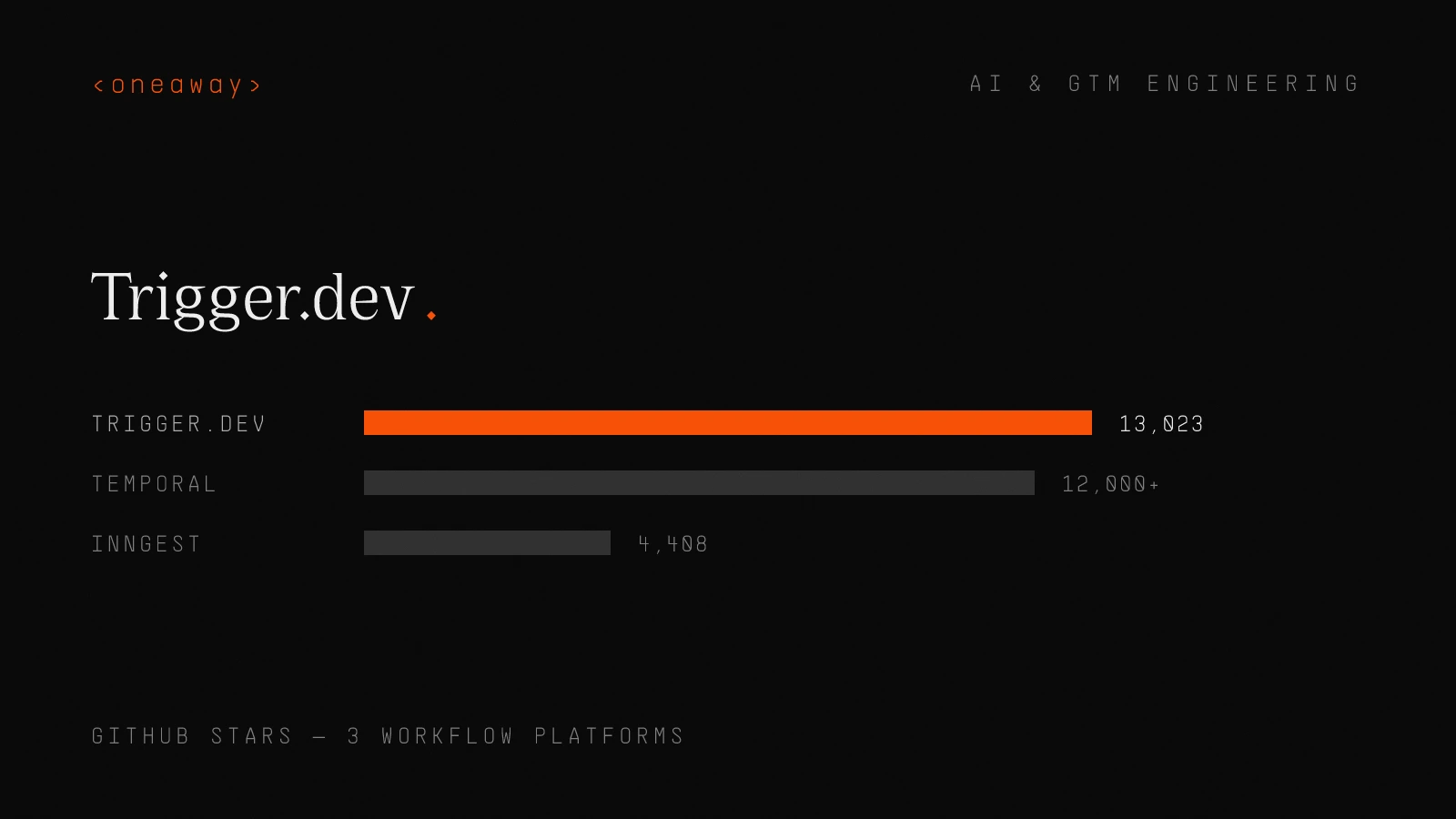
| GitHub Stars | 13,023 |
The Problem It Solves
The Serverless Timeout Problem
Most developers build on serverless platforms like Vercel or AWS Lambda. These platforms have hard timeout limits:
| Platform | Timeout Limit |
|---|---|
| Vercel Hobby | 10 seconds |
| Vercel Pro | Up to 5 minutes |
| AWS Lambda | 15 minutes max |
AI workflows often need more time. A single LLM call can take 30+ seconds. Chain a few together with data enrichment, and you're way past these limits.
The workarounds suck: Background queues, message brokers, edge functions, polling mechanisms. Developers waste hours implementing infrastructure that shouldn't be their problem.
Trigger.dev calls this the "Timeout Tax"—the hidden cost of fighting serverless limits instead of building features.
The No-Code Scaling Problem
No-code tools like Zapier and Make work great for simple automations. Three steps, basic logic, done.
But they break at scale:
A real example: One retailer's Zapier workflow hit rate limits at 10,000 daily orders. They rebuilt it as a Node.js service that handled 100,000+ orders with batching, retries, and structured logging.
"No-code got them moving, but code got them scaling."
Where no-code breaks down:
- Rate limits and API throttling
- Complex error handling and retries
- Version control and collaboration
- Debugging multi-step workflows
- Cost at high volume (per-execution pricing adds up)
Why GTM Engineers Should Care
What Is a GTM Engineer?
A GTM (Go-to-Market) Engineer bridges sales, marketing, and technology. They're not purely technical, not purely commercial—their value comes from blending both.
| Metric | Value |
|---|---|
| Job Growth (YoY) | 205% |
| New Postings Monthly | ~100 |
| Median Salary | $127,500 |
| LinkedIn Profiles | 3,000+ |
GTM Engineers design, build, and automate repeatable systems that support go-to-market motions. They're becoming what DevOps became to software—the invisible engine driving speed and scalability.
Key Responsibilities
- System integration (CRM, marketing automation, data pipelines)
- Lead scoring and routing automation
- Data enrichment (firmographics, technographics, intent signals)
- Cross-functional alignment between product, marketing, sales, customer success
Why Trigger.dev Fits
GTM Engineers build complex automations that touch multiple systems. A typical workflow might:
- Receive a webhook when a lead fills out a form
- Enrich the lead with 5-10 data providers
- Score the lead based on ICP fit
- Route to the right rep based on territory
- Create records in CRM, Slack, and task management
- Trigger a personalized outreach sequence
That's 6+ steps with dependencies, error handling, and multiple API calls. No-code tools make this a visual nightmare. Trigger.dev lets you write it as clean TypeScript with proper version control.
Trigger.dev vs Alternatives
Three platforms dominate the TypeScript workflow orchestration space: Temporal, Inngest, and Trigger.dev.
| Feature | Trigger.dev | Temporal | Inngest |
|---|---|---|---|
| Best for | AI agents, TypeScript devs | Enterprise batch processing | Event-driven, real-time |
| Learning curve | Low | Steep | Medium |
| Infrastructure | Managed or self-host | Self-managed or cloud | Managed |
| GitHub stars | 13,023 | 12,000+ | 4,408 |
| Human-in-the-loop | Native (waitpoints) | Possible but complex | Limited |
Temporal
Best for: Large-scale batch processing, mission-critical workflows.
Temporal was created by Uber engineers as a fork of Cadence. It's the most battle-tested option for enterprise workloads.
Use case: Processing 100,000 product descriptions? A parent workflow spawns thousands of child workflows that run for days.
Tradeoff: Higher learning curve, more infrastructure overhead. You're managing more yourself.
Inngest
Best for: Event-driven, low-latency AI applications.
Inngest uses native language primitives for direct execution. Debugging is simpler than Temporal.
Tradeoff: Less community adoption (4,408 GitHub stars vs Trigger.dev's 13,023). Fewer resources and examples available.
Trigger.dev
Best for: TypeScript developers who want production AI agents without infrastructure complexity.
The positioning is "easier-to-use Temporal with integrations." You write tasks in plain async code, deploy to cloud or self-host, and let Trigger.dev handle the orchestration.
Key differentiator: The DX focus. Real IDE support, proper debugging, version control baked in. For developers who already know TypeScript, there's almost no learning curve.
When to Use Code vs No-Code
This isn't an either/or decision. It's about matching the tool to the job.
When No-Code Wins
- Prototypes and validation: Test an idea before investing in code
- Non-critical workflows: Internal notifications, simple data syncing
- Marketing/ops self-service: Let non-technical teams build their own automations
- Simple integrations: Less than 3 steps, straightforward logic
When Code Wins
- Performance matters: Optimize runtime, memory, latency
- Complex error handling: Custom retries, fallbacks, logging
- Legacy system integration: APIs that no-code tools don't support
- Compliance requirements: Audit trails, data governance
- Scale: Per-execution pricing becomes expensive at volume
The Decision Framework
Ask these questions:
- Will this workflow change frequently? No-code is faster to iterate.
- Does it need to handle edge cases? Code gives you control.
- What's the volume? High volume = code for cost efficiency.
- Who maintains it? Technical team = code. Mixed team = no-code.
- Is it mission-critical? Critical = code for reliability.
Real-World Use Cases
My Meeting Research Workflow
When someone books a meeting with me, a webhook fires to Trigger.dev. The workflow:
- Extracts company information from the booking
- Fires 7 parallel research tasks via Exa
- Analyzes results with DeepSeek
- Structures the data and pushes to Notion
- Sends me a Slack notification with the summary
All of this happens in the background before the meeting. I walk in knowing their company size, recent news, tech stack, and potential pain points.
Building this in Zapier would be a mess—7 parallel branches, API calls that timeout, no proper error handling. In Trigger.dev, it's ~100 lines of TypeScript.
MagicSchool AI
MagicSchool is the fastest-growing ed-tech company with 4.5M teachers on the platform.
Challenge: Teachers needed real-time insights into student AI interactions.
Solution: Trigger.dev task fires when an AI response completes → queries data → runs analysis via Vercel AI SDK → broadcasts to teachers via Supabase Realtime.
Result: 1 million+ student interactions summarized in weeks.
"With Trigger.dev, we've summarized over a million student interactions in just a couple of weeks." — Ben Duggan, Staff Software Engineer at MagicSchool AI
Icon.com
Icon uses Trigger.dev for AI ad creation at scale—generating thousands of custom video ads and static assets.
The workflow involves parallel processing, long-running video generation tasks, and reliable delivery. Exactly the kind of workload that would choke a no-code tool.
How to Get Started
Step 1: Install the CLI
npx trigger.dev@latest initThis scaffolds a new project or adds Trigger.dev to an existing one.
Step 2: Write Your First Task
import { task } from "@trigger.dev/sdk/v3";

export const helloWorld = task({
  id: "hello-world",
  run: async (payload: { name: string }) => {
    console.log(`Hello, ${payload.name}!`);
    return { message: `Greeted ${payload.name}` };
  },
});
Step 3: Deploy
npx trigger.dev@latest deployYour task is now running in Trigger.dev's cloud. Trigger it via webhook, schedule, or API call.
Step 4: Add AI Logic
import { task } from "@trigger.dev/sdk/v3";
import { generateText } from "ai";
import { openai } from "@ai-sdk/openai";

export const analyzeCompany = task({
  id: "analyze-company",
  run: async (payload: { companyName: string }) => {
    const result = await generateText({
      model: openai("gpt-4"),
      prompt: `Analyze ${payload.companyName} and identify their main pain points.`,
    });
    return { analysis: result.text };
  },
});
Resources
- Trigger.dev Documentation
- AI Agents Guide
- GitHub Repository
- MCP Integration (for Claude/Cursor users)
Frequently Asked Questions
What is Trigger.dev used for?
Trigger.dev is used for running background jobs and AI workflows in TypeScript. Common use cases include data processing pipelines, AI agent orchestration, webhook handling, and any task that needs to run longer than serverless timeout limits allow.
Is Trigger.dev free?
Trigger.dev has a free tier for development and small workloads. Production usage is priced based on compute time. You can also self-host the open-source version for free if you manage your own infrastructure.
How does Trigger.dev compare to Zapier?
Zapier is a no-code automation tool for simple workflows. Trigger.dev is a code-first platform for complex, long-running tasks. Use Zapier for quick integrations under 3 steps. Use Trigger.dev when you need performance, error handling, or workflows that run longer than a few minutes.
Can Trigger.dev run AI agents?
Yes. Trigger.dev is specifically designed for AI agent workflows. Features like checkpoint-resume execution, parallel task orchestration, and human-in-the-loop waitpoints make it ideal for multi-step AI pipelines.
What programming language does Trigger.dev use?
Trigger.dev uses TypeScript (and JavaScript). You write tasks in your normal IDE with full access to npm packages, version control, and debugging tools.
Does Trigger.dev integrate with Vercel?
Yes. Trigger.dev works alongside Vercel. Your Next.js app handles the frontend and API routes while Trigger.dev handles background jobs that would otherwise timeout on Vercel's serverless functions.
Key Takeaways
- Trigger.dev is an open-source background jobs platform for TypeScript that solves serverless timeout limits and no-code scaling problems.
- Checkpoint-resume execution lets tasks run for minutes or hours without infrastructure headaches.
- GTM Engineers benefit most because they build complex, multi-system automations that break no-code tools at scale.
- Use Trigger.dev over Temporal when you want easier setup. Use it over Inngest when you want stronger community support.
- No-code still has its place for prototypes, simple workflows, and non-technical team self-service.
- Real production use cases include AI research pipelines, ed-tech analytics (MagicSchool AI), and creative asset generation (Icon.com).
The bottom line: if you're a developer building AI workflows that need to scale, Trigger.dev removes the infrastructure pain so you can focus on the actual product.
Building AI-Powered GTM Systems?
If you're looking to automate your go-to-market workflows with AI, we can help. At oneaway, we specialize in helping B2B SaaS companies build outbound systems that actually convert.
Let's talkContinue Reading
Best AI Sales Forecasting Models in 2026, Ranked by Accuracy
I tested 11 AI sales forecasting models with real pipeline data. Here's what actually works, ranked by accuracy, cost, and whether your CRM can handle it.
Read more [ 14 MIN READ ]Best AI Sales Team Workflows in 2026, Ranked by Time Saved
I tested dozens of AI tools sales team workflows. Here's what actually saves time in 2026, ranked by hours recovered per rep per week—with real implementation data.
Read more [ 18 MIN READ ]Best AI GTM Tools for Revenue Teams in 2026, Ranked by Impact
I've tested dozens of AI GTM tools as a former AWS/Salesforce SDR turned GTM engineer. Here's what actually moves revenue in 2026, ranked by real-world impact.
Read more