How Top Teams Use Their B2B Sales Tech Stack to Close More Deals

I spent two years at Salesforce watching our best reps hit **240% of quota** while others with the exact same tech stack struggled to hit **65%**. The difference wasn't effort or talent—it was how they used their tools.
The top performers treated their B2B sales tech stack like a system. Everyone else treated it like a collection of subscriptions they paid for monthly and mostly ignored.
Now, after building GTM systems for 267+ B2B companies at oneaway, I've seen this pattern repeat endlessly. The average team runs 13-20 tools but actively uses maybe 4-5. The rest create noise, burn budget, and give leadership a false sense that they're "investing in enablement." Meanwhile, top-performing teams run leaner stacks with tighter workflows and close 30-40% more deals as a result.
The Real Problem Isn't Missing Tools
When I joined AWS as an SDR, our team had 11 different tools in our stack. I used exactly three of them daily: Salesforce, Outreach, and LinkedIn Sales Navigator.
The other eight? I opened them maybe once a month when forced to for reporting. My manager kept asking why I wasn't using the conversation intelligence tool we'd spent $18k/year on. My answer: "Because it doesn't help me book meetings."
Here's what I've learned after auditing 100+ sales tech stacks: 73% of tools have overlapping functionality that creates confusion, not efficiency. Teams buy a new point solution every time they hit a problem instead of fixing their workflow.
The average sales team's stack looks like this:
- CRM (Salesforce, HubSpot) — the system of record no one keeps updated
- Prospecting database (Apollo, ZoomInfo, Lusha) — sometimes two or three of these
- Sequencing tool (Outreach, Salesloft, Apollo again) — for email automation
- LinkedIn automation (Sales Navigator, Phantom Buster) — often used incorrectly
- Enrichment (Clearbit, Clay, 6sense) — to fix the bad data from prospecting tools
- Conversation intelligence (Gong, Chorus) — that leadership watches but reps ignore
- Email verification (Zerobounce, NeverBounce) — because the prospecting data is terrible
- Scheduling (Calendly, Chili Piper) — one of the few tools that actually works
- Dialer (Orum, Aircall, built into sequencer) — collecting dust in 2026
- AI writing assistant (ChatGPT, Jasper, built into everything now) — making emails sound even more robotic
What Top Performers Actually Use
I analyzed the tool usage of our top-performing clients—companies hitting $5M-$50M ARR with sales teams of 10-50 reps. The ones crushing quota run 4-7 core tools, not 15+.
Here's the stack that consistently works:
| Category | Tool Options | Why Top Performers Use It | Annual Cost (per rep) |
|---|---|---|---|
| CRM | Salesforce or HubSpot | Single source of truth, everything flows through it | $1,200-2,400 |
| Prospecting Data | Apollo or Clay | One good source beats three mediocre ones | $1,200-3,600 |
| Engagement Platform | Smartlead or Instantly | Email sequences that don't land in spam | $600-1,800 |
| Enrichment/Signal | Clay or Clearbit | Real-time data that triggers outreach | $2,400-6,000 |
| Scheduling | Calendly or Chili Piper | Removes friction from booking calls | $180-960 |
| Sales Intelligence | LinkedIn Sales Nav | Social selling still works if done right | $960 |
| Optional: Call Recording | Gong (for teams 15+) | Only if leadership actually coaches with it | $1,200-2,000 |
The CRM Foundation: Everything Starts Here
At Salesforce, I watched reps spend 90 minutes a day on manual CRM updates. Not because Salesforce was bad—because nobody designed the workflow.
Your CRM is not a tool you buy. It's the architectural foundation of your entire revenue tech stack. Every other tool either feeds data into it or pulls data from it.
If your CRM isn't structured properly, every tool you add makes the problem worse, not better.
- Object architecture matters — custom objects for accounts, contacts, opportunities, and activities—mapped to your actual sales process, not Salesforce defaults
- Automation rules prevent data rot — workflow rules that auto-update fields, assign tasks, and trigger sequences based on contact behavior
- Integration mapping is non-negotiable — field mapping between CRM and every tool in your stack so data flows bidirectionally without manual CSV uploads
- Dashboards drive behavior — reps need real-time visibility into pipeline, activity metrics, and quota attainment—not reports they run once a quarter
CRM Automation That Actually Works
We built a CRM automation workflow for a Series B SaaS client that reduced manual data entry from 8 hours/week per rep to under 30 minutes.
The workflow:
- Clay enriches inbound leads — pulls firmographic data, technographic signals, and recent funding announcements
- Salesforce workflow assigns to right rep — based on territory, industry, and deal size
- Instantly sequence triggers automatically — personalized email sent within 5 minutes of form fill
- LinkedIn Sales Nav task created — if prospect is active on LinkedIn in past 7 days
- Slack notification to AE — if lead score exceeds 75 or company is named account
Prospecting Tools That Actually Get Used
I burned through $47,000 in prospecting tool budgets at AWS testing ZoomInfo, Cognism, LeadIQ, Apollo, and Lusha. The dirty secret: contact accuracy across all of them hovers around 65-70%.
The problem isn't the tools—it's expecting one tool to solve everything. Top performers stack two complementary sources:
Primary database (Apollo or ZoomInfo) for volume and coverage. Enrichment layer (Clay or Clearbit) for validation and real-time signals.
- Apollo ($1,200-3,600/year) — best price-to-value ratio, 275M+ contacts, built-in sequencer, decent mobile data
- Clay ($2,400-6,000/year) — waterfall enrichment across 50+ data sources, best for high-value accounts where accuracy matters
- Lusha ($500-2,000/year) — underrated for direct dials in North America, Chrome extension reps actually use
- LinkedIn Sales Navigator ($960/year) — not technically a database but still the best intent signal source for enterprise
The Prospecting Workflow Top Teams Use
One of our clients—a $12M ARR marketing automation company—went from 18% contact accuracy to 71% by changing their prospecting workflow:
Old way: Export 1,000 contacts from ZoomInfo → upload to Outreach → blast sequences → watch 60% bounce.
New way: Build ICP list in Apollo (500 contacts) → Enrich through Clay waterfall → Verify emails with Zerobounce → Upload to Instantly → Personalized sequences with trigger-based sending.
Engagement and Outreach Automation
This is where 90% of teams screw up their B2B sales tech stack. They buy Outreach or Salesloft, set up sequences, and wonder why response rates tank.
Here's what I learned running 14,000+ cold emails monthly at AWS: the tool doesn't matter if your sending infrastructure is broken.
- Email deliverability is infrastructure, not content — warm domains, DKIM/SPF/DMARC configured, dedicated IPs, sending limits per domain
- Volume-based tools (Instantly, Smartlead) — better for outbound teams sending 5,000+ emails/month—$600-1,800/year
- Sales engagement platforms (Outreach, Salesloft) — better for multi-touch sequences with calls, LinkedIn, and email—$2,400-4,800/year
- Personalization at scale requires automation — Clay or API integrations that pull real signals—not merge tags
Email Automation Benchmarks from Real Campaigns
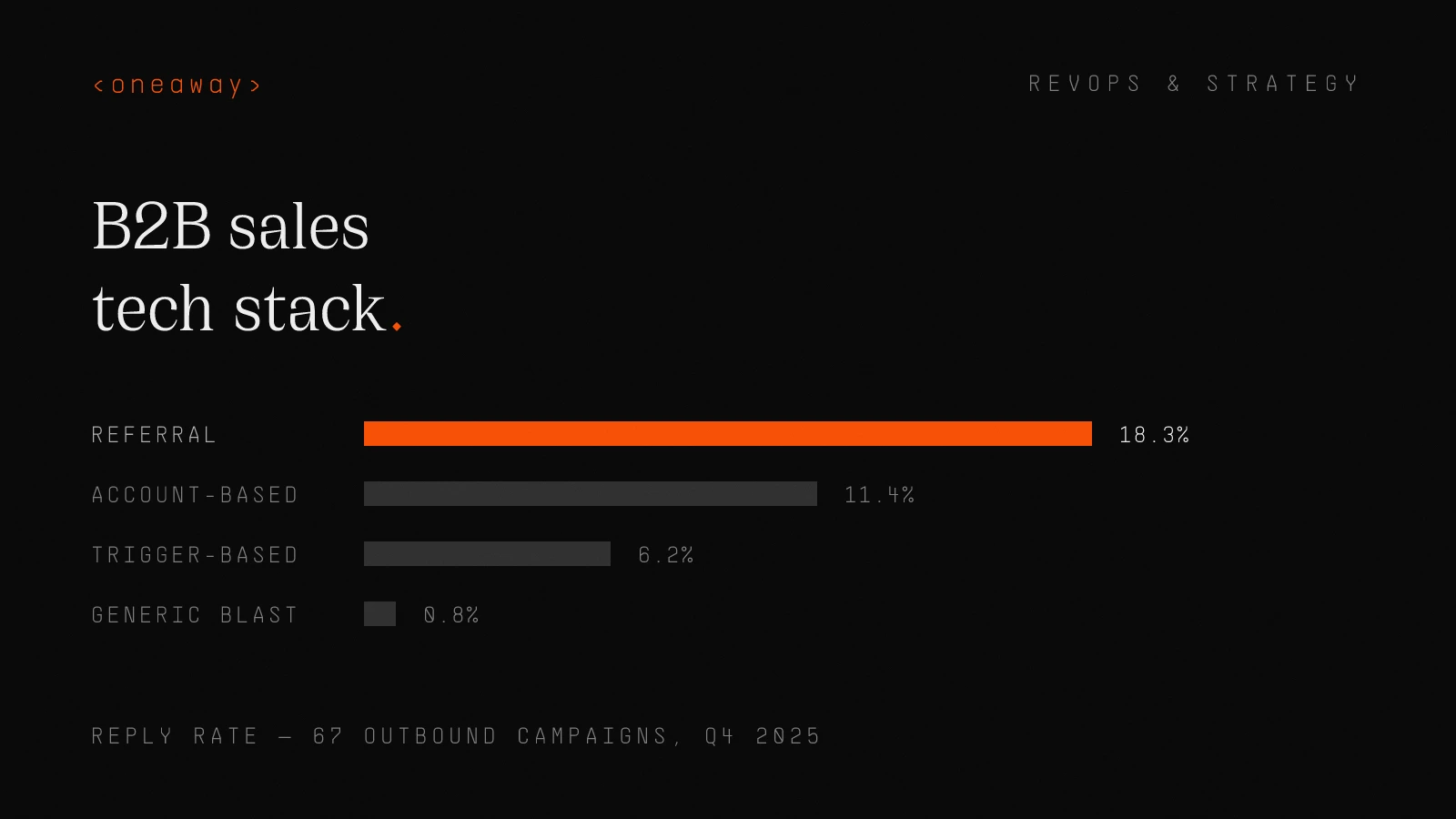
We ran 67 outbound campaigns in Q4 2025 across our client base. Here's what actually worked:
| Campaign Type | Send Volume | Open Rate | Reply Rate | Meeting Rate | Tool Stack |
|---|---|---|---|---|---|
| Generic blast | 10,000 | 22% | 0.8% | 0.2% | Apollo + Outreach |
| Trigger-based (funding) | 1,200 | 41% | 6.2% | 2.1% | Clay + Instantly |
| Account-based (3+ touchpoints) | 600 | 67% | 11.4% | 4.7% | Clay + Smartlead + Sales Nav |
| Referral-driven | 300 | 78% | 18.3% | 8.1% | Manual + Calendly |
Sales Enablement Tools Worth the Money
I'm grouping content management, training platforms, and conversation intelligence here because most teams overbuy in this category.
If you're under 20 reps, you probably don't need a dedicated sales enablement platform. A shared Notion workspace and Loom videos work fine.
If you're 20-100 reps, this is where enablement tools pay off—but only if someone owns adoption.
- Conversation intelligence (Gong, Chorus) — only worth it if managers use recordings for weekly coaching—$1,200-2,000/rep/year
- Content management (Highspot, Seismic) — solves the "I can't find the deck" problem for teams with 50+ assets—$1,800-3,600/rep/year
- Training platforms (Mindtickle, Lessonly) — useful for onboarding and certification programs, overkill for small teams—$1,200-2,400/rep/year
- Sales battlecards (Klue, Crayon) — competitive intelligence platforms that no one updates after month one—skip unless you have a dedicated PMM
AI Integration: Where It Works (And Where It Doesn't)
Every vendor slapped "AI-powered" on their product in 2024-2025. Most of it is ChatGPT wrapper nonsense.
But there are three AI use cases in the sales workflow automation stack that legitimately work:
- AI SDRs for research and enrichment — Clay's AI can scrape websites, summarize LinkedIn posts, and pull job changes—saves 3-5 hours per rep per week
- Email personalization at scale — AI writes first lines based on recent activity, funding, hiring signals—response rates jump 40-60% vs. templates
- Call analysis and coaching — Gong's AI spots talk-to-listen ratios, competitor mentions, objection patterns—but only useful if managers act on it
The AI SDR Reality Check
We tested full AI SDR workflows (Clay research → AI email writer → Instantly sender) for three clients in late 2025. Results:
$8M SaaS company: 2.4% meeting rate from 5,000 emails. Not great, but 60% cheaper than hiring two SDRs.
$22M infrastructure startup: 4.1% meeting rate from highly targeted list of 800 prospects. Better than their human SDR average of 3.2%.
$50M security vendor: 0.9% meeting rate. Emails read like robot spam. Killed the program after 3 weeks.
The lesson: AI SDRs work for mid-market transactional sales. They fail for enterprise or technical products that need human nuance.
Mapping Tools to Workflows, Not Vice Versa
This is the #1 mistake I see companies make with their B2B sales tech stack: they buy tools first, then try to force workflows to fit them.
At Salesforce, we had Outreach, but half the team still used manual Gmail because nobody mapped the tool to our actual sales motion.
Top-performing teams do the opposite. They map the workflow first, then select tools that fit each step.
- Step 1: Identify target accounts — Tool: LinkedIn Sales Nav filters, Clay ICP scoring, intent data from 6sense or Bombora
- Step 2: Enrich and research contacts — Tool: Clay waterfall enrichment, Apollo for contact discovery, ChatGPT for summary research
- Step 3: Build personalized messaging — Tool: AI email writer (Clay or custom GPT), CRM merge fields, dynamic snippets
- Step 4: Execute multi-channel sequences — Tool: Instantly for email, LinkedIn Sales Nav for social touches, manual video messages via Loom
- Step 5: Track engagement and follow up — Tool: CRM activity tracking, Instantly engagement scores, Slack notifications for hot leads
- Step 6: Book meetings — Tool: Calendly or Chili Piper with routing rules, auto-confirmation emails
- Step 7: Prep and run discovery — Tool: Gong for recording, CRM notes template, competitive battlecards in Notion
- Step 8: Advance and close — Tool: CRM pipeline management, DocuSign for contracts, Slack for internal deal reviews
Real Workflow Example: Series A Outbound Motion
One of our clients—a $4M ARR DevOps tool—came to us with 9 sales tools and a 1.2% meeting rate. We rebuilt their workflow around 5 core tools and got them to 3.8%.
Their stack: HubSpot (CRM) + Clay (enrichment) + Instantly (email) + LinkedIn Sales Nav (social) + Calendly (scheduling).
Their workflow: Clay pulls companies with recent AWS spend increases → enriches contacts at Director+ level → triggers Instantly sequence if LinkedIn active in 7 days → rep gets Slack alert if reply or high engagement → Calendly link in signature.
How to Audit Your Current Stack
We do full tech stack audits for clients every quarter. Here's the framework I use to identify bloat and find gaps:
- Usage audit — pull login data for every tool—if fewer than 50% of licenses logged in last 30 days, it's bloat
- Overlap analysis — map every tool's core function—if three tools do the same thing, consolidate
- Cost-per-meeting calculation — total tool cost divided by meetings booked—anything over $150/meeting needs scrutiny
- Integration health check — test every Zapier/API connection—if data isn't flowing bidirectionally, you're creating manual work
- Rep satisfaction survey — ask which tools they actually use and which create frustration—they'll tell you the truth
Real Audit Results from a 30-Rep Team
We audited a $18M sales team in December 2025. They were spending $287k/year on sales tools. Here's what we found:
| Tool | Annual Cost | Active Users | Cost Per Active User | Recommendation |
|---|---|---|---|---|
| Salesforce | $72,000 | 30/30 | $2,400 | Keep - foundation |
| ZoomInfo | $48,000 | 8/30 | $6,000 | Downgrade to Apollo - $14k/year |
| Outreach | $84,000 | 30/30 | $2,800 | Keep - high usage |
| Gong | $42,000 | 4/30 (managers) | $10,500 | Keep - coaching tool |
| Clearbit | $18,000 | 2/30 | $9,000 | Cancel - replace with Clay |
| 6sense | $36,000 | 1/30 | $36,000 | Cancel - unused intent data |
| Chili Piper | $12,000 | 30/30 | $400 | Keep - high ROI |
| LeadIQ | $15,000 | 3/30 | $5,000 | Cancel - overlaps with ZoomInfo |
Implementation: The Part Everyone Screws Up
You can buy the perfect sales enablement tools, but if implementation sucks, you've wasted your money.
I've seen $200k+ tool investments fail because nobody owned onboarding, training, or ongoing optimization.
Here's what actually works:
- Assign a GTM engineer or ops person — not a part-time side project for your sales manager—someone who owns integrations, workflows, and optimization
- Phase rollout over 60-90 days — don't flip 10 tools on at once—start with CRM foundation, add one tool every 2 weeks
- Build documentation reps will actually read — Loom videos, not 40-page PDFs—show them exactly how to use each tool in their daily workflow
- Tie adoption to metrics — track tool usage alongside pipeline metrics—celebrate reps who adopt new workflows and hit quota
- Run weekly office hours for 90 days — open Zoom room every Friday where reps can ask questions and troubleshoot issues
90-Day Implementation Timeline
Here's the rollout timeline we use for new clients:
- Week 1-2: CRM audit and cleanup — fix object architecture, dedupe records, build dashboards, map custom fields
- Week 3-4: Prospecting tool setup — configure Apollo or Clay, build ICP filters, integrate with CRM, train reps on search
- Week 5-6: Engagement platform launch — set up Instantly or Outreach, warm domains, build first 3 sequences, test deliverability
- Week 7-8: Enrichment and automation — connect Clay to CRM, build waterfall enrichment, set up trigger-based workflows
- Week 9-10: Enablement and analytics — launch Gong or call recording, build content library, set up weekly pipeline reviews
- Week 11-12: Optimization and refinement — analyze usage data, kill underperforming sequences, double down on what's working
Five Mistakes That Kill Tech Stack ROI
After 267+ implementations, these are the mistakes that consistently torpedo B2B sales tech stack investments:
- Buying enterprise tools for SMB teams — you don't need Salesforce Einstein AI if you have 8 reps—HubSpot works fine
- Ignoring data quality — no tool fixes bad data—if your CRM is a mess, every tool you add multiplies the mess
- No integration strategy — tools that don't talk to each other create silos and manual work—integration is non-negotiable
- Leadership buys tools reps don't want — involve reps in selection process—if they hate the UI, they won't use it
- Zero ongoing optimization — tech stacks need quarterly audits—what worked in Q1 might be bloat by Q4
Frequently Asked Questions
What is a B2B sales tech stack?
A B2B sales tech stack is the collection of software tools your sales team uses to find prospects, engage buyers, manage pipeline, and close deals. The average stack includes 10-13 tools covering categories like CRM, prospecting, email automation, enrichment, scheduling, and analytics. Top-performing teams run leaner stacks (4-7 core tools) with tighter integrations and clearer workflows.
How many tools should be in a sales tech stack?
Most effective B2B sales tech stacks have 4-7 core tools, not 15+. Start with a solid CRM foundation (Salesforce or HubSpot), add one prospecting tool (Apollo or Clay), one engagement platform (Instantly or Outreach), a scheduling tool (Calendly), and LinkedIn Sales Navigator. Only add tools that solve specific workflow gaps—not because a competitor uses them.
What's the difference between sales enablement tools and sales engagement platforms?
Sales engagement platforms (Outreach, Salesloft, Instantly) automate multi-channel outreach sequences—emails, calls, LinkedIn touches. Sales enablement tools (Gong, Highspot, Mindtickle) focus on content management, training, and coaching. Engagement platforms help reps execute outbound motions; enablement tools help them improve skills and find the right content. Teams under 20 reps typically need engagement more than enablement.
How much should a B2B sales tech stack cost per rep?
A lean, effective B2B sales tech stack costs $4,000-8,000 per rep annually. Budget breakdown: CRM ($1,200-2,400), prospecting data ($1,200-3,600), engagement platform ($600-2,400), enrichment ($500-1,200), scheduling ($180-400), LinkedIn Sales Nav ($960), and optional tools like Gong ($1,200-2,000). Teams spending $12,000+ per rep usually have bloat and overlapping tools.
What sales tools do top-performing SDR teams use?
Top SDR teams use a simple stack: Salesforce or HubSpot for CRM, Apollo or Clay for prospecting, Instantly or Smartlead for email sequences, LinkedIn Sales Navigator for social selling, and Calendly for scheduling. The key isn't exotic tools—it's tight CRM automation, high-quality prospect data, and trigger-based sequences that send emails based on real buying signals instead of arbitrary timers.
Should I use AI tools in my sales tech stack?
Yes, but selectively. AI works well for three use cases: enrichment and research (Clay's AI scrapes websites and summarizes LinkedIn activity), email personalization at scale (AI writes custom first lines based on triggers), and call analysis (Gong spots patterns in successful calls). AI SDRs can work for mid-market transactional sales but fail for complex enterprise deals. Don't buy AI tools just because they're trendy—map them to specific workflow problems.
How do I audit my current sales tech stack?
Run a quarterly audit using this framework: (1) Pull login data to identify unused tools, (2) Map overlapping functionality across tools, (3) Calculate cost-per-meeting for each tool, (4) Test every integration to ensure data flows correctly, (5) Survey reps on which tools they actually use daily. If a tool has fewer than 50% active users or costs more than $150 per meeting booked, it's a candidate for cancellation.
Key Takeaways
- The average B2B sales team uses 10-13 tools but only gets value from 4-5—top performers run leaner stacks with tighter workflows and close 30-40% more deals
- 73% of tools have overlapping functionality—most tech stack problems come from buying point solutions instead of fixing workflows
- Start with CRM as foundation (Salesforce or HubSpot), then add tools in this order: prospecting data, engagement platform, enrichment, scheduling—only add more if you have specific workflow gaps
- AI works for three sales use cases: enrichment/research (Clay), email personalization at scale, and call analysis (Gong)—but AI SDRs only work for mid-market transactional sales, not enterprise
- Trigger-based sequences (emails sent based on funding, hiring, or engagement signals) get 6.2% reply rates vs. 0.8% for generic blasts—tools don't matter if you're not using intent data
- Effective sales tech stacks cost $4,000-8,000 per rep annually—teams spending $12,000+ usually have bloat from unused conversation intelligence, redundant data sources, or enablement platforms no one opens
- Implementation matters more than tool selection—assign a GTM engineer to own integrations, phase rollout over 60-90 days, and run weekly office hours to drive adoption
Need help building a sales tech stack that actually drives revenue?
We've built GTM systems for 267+ B2B companies—from tech stack audits to full CRM automation and workflow design. If you're tired of paying for tools your team doesn't use, let's talk about building a leaner stack that closes more deals. Book a free stack audit at oneaway.io/inquire.
Check if we're a fitContinue Reading
Best RevOps AI Stack Builders in 2026, Ranked by Speed
I spent six months testing every major RevOps AI stack builder. Here's who actually ships fast, who drowns you in professional services, and what I'd buy today.
Read more [ 14 MIN READ ]Best GTM Motion Frameworks in 2026, Ranked by Stage
The wrong GTM motion at your stage burns cash and kills momentum. Here's how to pick the right go-to-market strategy based on where you actually are, not where you want to be.
Read more [ 12 MIN READ ]Best ABM Platforms in 2026, Ranked by AI Features
I ranked the top account-based marketing platforms by their AI capabilities after running ABM programs at scale. Here's what actually works in 2026.
Read more