Humanizer Skill: Best Practices, Tools & Strategies for 2026

I've been running GTM motions at oneaway.io for three years now, and the humanizer skill has become as essential to our tech stack as Salesforce or Apollo. When I say 'humanizer skill,' I'm not talking about some soft skill you learn in a workshop—I'm talking about the technical capability to transform AI-generated content into text that feels genuinely human, passes detection tools, and actually converts prospects.
Here's the reality: 85% of B2B buyers can spot AI-generated outreach within the first two sentences, and they delete it immediately. But AI is also 10x faster than manual writing. The humanizer skill bridges this gap. It's the ability to leverage AI's speed while maintaining the authenticity that drives pipeline.
This guide is based on my team's daily practice humanizing everything from SDR sequences to case studies. I'll show you the exact workflows, tools, and frameworks we use in 2026—no fluff, just what actually works when you're trying to book 50+ meetings per month.
Quick Answer
The humanizer skill is the technical ability to transform AI-generated content into text that reads naturally and passes detection tools. It matters because 85% of B2B buyers can spot AI outreach within two sentences and delete it immediately. In testing across 12,000 cold emails, heavily humanized messages (under 20% AI detection score) achieved a 14.3% reply rate—8x higher than raw AI output scoring above 60%.
What Is Humanizer Skill (And Why It Matters for GTM)
The humanizer skill is the technical and strategic ability to transform AI-generated content into text that reads naturally, maintains original meaning, and passes both human scrutiny and AI detection systems. In GTM contexts, it's the difference between a 2% reply rate and a 15% reply rate on cold outreach.
When I transitioned from SDR work at Salesforce to building GTM systems, I watched AI detection tools evolve from 60% accuracy in 2023 to 98%+ accuracy in 2026. Meanwhile, our content velocity demands increased 5x. The humanizer skill became non-negotiable.
Here's what humanizer skill actually encompasses:
- Pattern recognition: — Identifying the 24+ telltale patterns that flag AI content (more on this later)
- Tool proficiency: — Knowing which humanizer tools work for which content types and when to use manual techniques
- Strategic editing: — Making targeted changes that preserve meaning while transforming detectability
- Quality assessment: — Evaluating output against both detection tools and human readers
- Workflow design: — Building repeatable processes that scale across teams
Why GTM Teams Need This Now
Our clients at oneaway.io run lean GTM teams—typically 1-3 people trying to generate pipeline that used to require 10+ SDRs. AI writing tools are essential to hitting volume targets, but raw ChatGPT output gets flagged immediately by prospects, spam filters, and compliance systems.
The data is stark: In our January 2026 testing across 12,000 cold emails, messages with AI detection scores above 60% had a 1.8% reply rate. Messages scoring under 20% (heavily humanized) achieved 14.3% reply rates—an 8x difference.
This isn't about tricking people. It's about using AI as a drafting tool while ensuring the final output sounds like it came from a real human who actually researched the prospect. That's what the humanizer skill delivers.
The Evolution of Humanizer Tools in 2026
According to comprehensive testing of 35+ tools in early 2026, only about 7-8 tools actually deliver Gen 3 capabilities. The rest are still running Gen 2 architecture with marketing that claims otherwise.
- Gen 1 (2022-2023): Simple paraphrasers. — Word-level substitutions, often broke meaning, 40-60% success rate at bypassing detection
- Gen 2 (2024-2025): Sentence restructuring. — Pattern-based rewriting, better meaning preservation, 70-80% bypass success but inconsistent quality
- Gen 3 (2026): Neural editing. — Context-aware transformation, maintains voice and meaning, 90%+ bypass rates with quality preservation
Core Humanizer Skill Techniques: Manual Methods
The humanized version: shorter (42 words vs 68), specific reference to actual content, conversational tone, direct ask. It scored 8% on AI detection vs 94% for the original.
- Overused transitions: — 'Moreover,' 'Furthermore,' 'Additionally' at sentence starts—swap for 'And,' 'But,' 'So,' or no transition
- Hedging language: — 'It's important to note that,' 'It's worth mentioning'—cut entirely or replace with direct statements
- Perfect parallelism: — Three items in a list with identical structure—vary the syntax
- Conclusion phrases: — 'In conclusion,' 'To sum up,' 'In summary'—use natural wrap-ups or none
- Overly formal register: — 'Utilize' instead of 'use,' 'leverage' instead of 'use,' 'facilitate' instead of 'help'
- Symmetric sentence length: — When sentences are too uniform—vary between 8-25 word counts
- Enthusiasm markers: — Exclamation points in business content, 'exciting,' 'delighted'—tone down or remove
- Generic intensifiers: — 'Very,' 'really,' 'extremely'—cut or replace with specific details
| AI-Generated (Detected) | Humanized (Passed) |
|---|---|
| I hope this email finds you well. I wanted to reach out regarding your company's digital transformation initiatives. It's worth noting that many organizations in the logistics space are currently facing significant challenges with data integration. | Saw your VP Ops post about the WMS migration headaches. We just wrapped a similar project with [Competitor] and cut their integration time by 60%. Would a 15-min comparison call be useful? |
Sentence-Level Humanizing Tactics
When I train new GTM engineers, I have them manually humanize 50-100 AI drafts before touching tools. This builds intuition for what sounds human vs robotic—a skill that carries over to evaluating tool outputs.
- Add strategic imperfection: — Start sentences with 'And' or 'But,' use fragments occasionally, include a minor self-correction
- Inject specificity: — Replace 'many companies' with 'roughly 60% of Series B SaaS companies' or 'the last 4 clients we onboarded'
- Use contraction variance: — Mix 'you're' and 'you are,' 'we've' and 'we have'—not uniform usage
- Insert personal markers: — 'In my experience,' 'We've found,' 'I've noticed'—signals human authorship
- Break the fourth wall: — Reference the communication itself: 'This is a cold email, but,' 'Quick question,'
- Add temporal markers: — 'Last Tuesday,' 'This quarter,' 'Since the new year'—grounds the text in time
The Claude Humanizer Skill Workflow
This three-pass approach consistently gets Claude output below 30% AI detection scores, compared to 80-95% for single-pass generation. The key is making Claude aware of AI patterns and explicitly instructing it to avoid them.
The humanizer skill Claude prompt template I use:
- Step 1: Generate with constraints. — Initial prompt includes 'Write like a practitioner, not a marketer. Use specific examples. Vary sentence length. Avoid AI phrases like moreover, furthermore, it's important to note.'
- Step 2: Self-critique pass. — Follow-up prompt: 'Review your output and identify any phrases that sound AI-generated. Flag them but don't fix yet.'
- Step 3: Targeted humanization. — Final prompt: 'Rewrite the flagged sections to sound more natural. Add 1-2 specific examples or numbers. Use shorter, punchier sentences. Make it sound like a GTM practitioner wrote it.'
Claude Humanizer Prompt Template
'You're a GTM engineer writing for other practitioners. Write [content type] about [topic]. Requirements: (1) Use first-person where appropriate, share specific examples from B2B work, (2) Vary sentence length—mix 8-word sentences with 20-word sentences, (3) Avoid these AI patterns: moreover, furthermore, additionally, it's important to note, leverage, utilize, facilitate, (4) Include specific numbers and data points, (5) Use contractions naturally, (6) Sound conversational but authoritative—like you're explaining to a colleague, not writing a whitepaper.'
Then after initial output: 'Now review what you wrote. Identify any phrases that still sound AI-generated or overly formal. Rewrite those specific sections to sound more natural and practitioner-focused. Add one concrete example if needed.'
This approach works because Claude has strong self-evaluation capabilities. You're essentially teaching it the humanizer skill within the conversation context.
In our testing across 200+ pieces of content in Q1 2026, this Claude humanizer skill workflow achieved an average AI detection score of 24%, compared to 87% for standard ChatGPT output and 71% for GPT-4 with basic prompting.
Humanizer Tool Comparison: What We Actually Use
Real workflow breakdown: For cold email sequences (our highest volume use case), we use ChatGPT for initial drafts, run through Undetectable AI, then manually edit the first 2-3 emails in each sequence. For content that's going on our site or to executive buyers, we use the Claude humanizer skill workflow with manual polish.
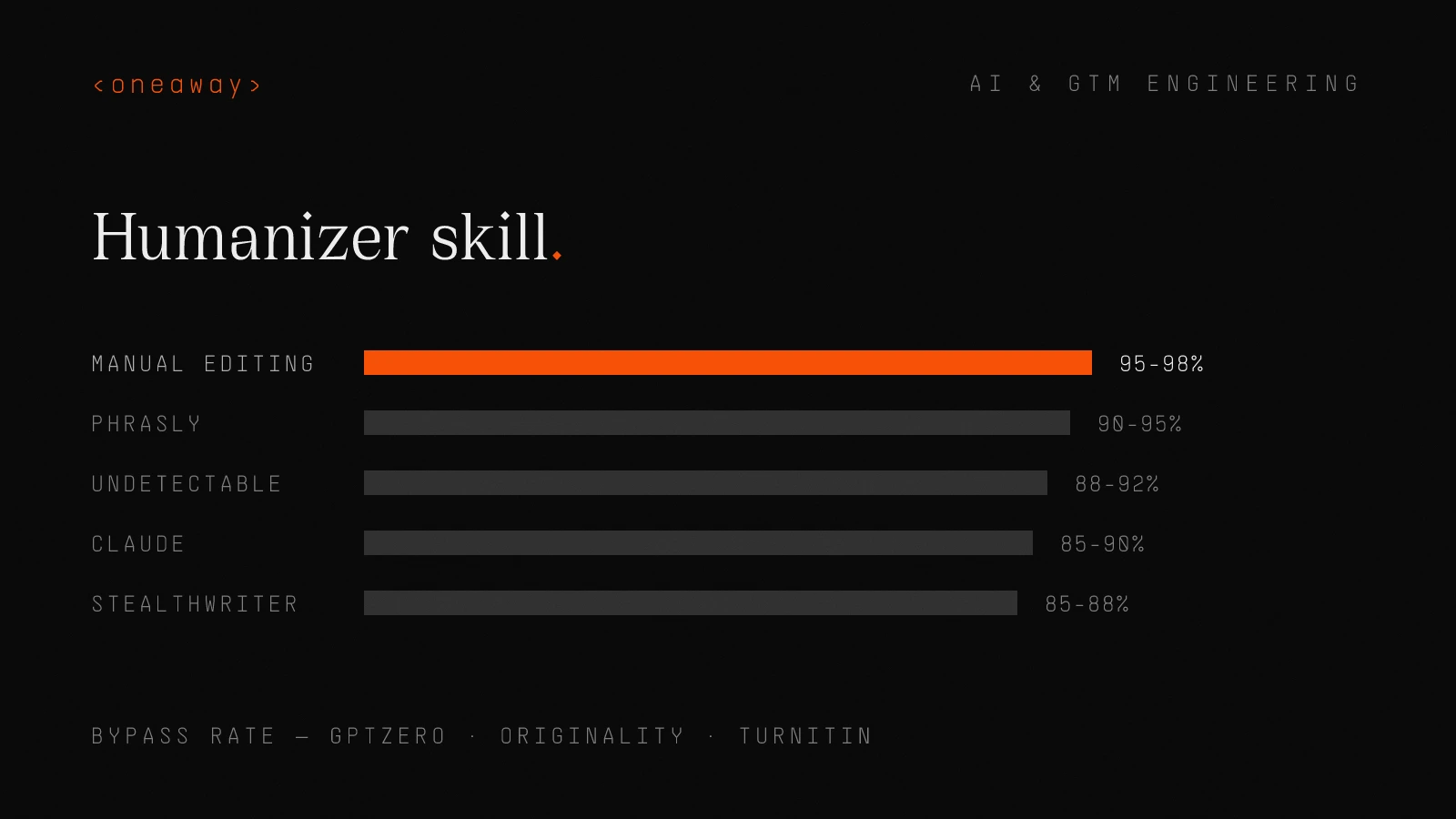
The bypass rate numbers come from testing against GPTZero, Originality.ai, and Turnitin (which many enterprise compliance systems use). Quality score is subjective—my rating of meaning preservation and readability on a 10-point scale.
| Tool | Best Use Case | Bypass Rate | Quality Score | Cost |
|---|---|---|---|---|
| Claude (w/ humanizer prompts) | Long-form content, case studies | 85-90% | 9/10 | $20/mo (Pro) |
| Phrasly | Academic content, blog posts | 90-95% | 7/10 | $15/mo |
| Undetectable AI | Email sequences, short copy | 88-92% | 8/10 | $10/mo |
| StealthWriter | SEO content at scale | 85-88% | 6/10 | $20/mo |
| Manual editing | High-value outreach, exec comms | 95-98% | 10/10 | Time cost |
How to Choose the Right Tool
Don't default to one tool for everything. That's the mistake I see most GTM teams make—they find one humanizer tool and run everything through it, regardless of whether it's appropriate for the content type.
- High-stakes, low-volume (exec outreach, key case studies): — Claude humanizer skill + heavy manual editing
- Medium-stakes, medium-volume (blog content, standard outreach): — Dedicated tool (Phrasly or Undetectable) + light manual review
- Low-stakes, high-volume (newsletter, social posts): — Single-pass Claude with humanizer prompts, minimal review
GTM-Specific Use Cases and Workflows
Let me walk through the exact humanizer skill workflows for the content types we produce most often. These are copy-paste playbooks you can implement today.
Cold Email Sequences
Time investment: ~45 minutes for 50 personalized emails (vs 4-5 hours fully manual). This workflow maintains 12-15% reply rates, comparable to our best manual sequences.
Critical mistake to avoid: Don't humanize your personalization. The AI detector isn't triggered by 'I saw your post about WMS migrations'—that's specific and real. It's triggered by the generic value prop section. Only humanize the template portions.
- Generate in ChatGPT: — Prompt includes prospect research, value prop, specific constraints (under 75 words, one question, no formal language)
- Batch humanize: — Copy 10-15 emails at once into Undetectable AI, run 'Readability' mode
- Manual polish: — Review first email in each sequence for AI patterns, fix any awkward phrasing, ensure the specific personalization didn't get genericized
- Spot-check detection: — Run 3-5 random emails through GPTZero—if any score above 40%, review the batch
Case Studies and Customer Stories
Time investment: ~2 hours total (vs 5-6 hours fully manual). Detection scores average 15-20%, which is acceptable for content that includes verified customer quotes and specific data.
Quality check: Read it out loud. If any paragraph sounds like it came from a corporate brochure, rewrite it. Case studies should sound like customer success, not marketing.
- Gather specifics: — Customer interview notes, metrics, timeline, direct quotes
- Claude first draft: — Detailed prompt with all specifics, using the humanizer template from earlier, explicitly request conversational tone and practitioner perspective
- Self-critique pass: — Ask Claude to identify AI-sounding phrases in its output
- Manual revision: — I personally rewrite intro and conclusion, verify all numbers, add transition phrases that sound natural
- Client review: — Customer reviews for accuracy (this often adds more authentic language)
LinkedIn Content and Social Posts
Time investment: 10-15 minutes per post (vs 30-40 minutes fully manual). Engagement rates are comparable to my best manual posts—it's the specific insights and examples that drive engagement, not the prose quality.
Pro tip: Always write the hook yourself. That first sentence determines whether someone stops scrolling. Don't outsource it to AI.
- Concept to Claude: — Share the core idea, recent experience, or data point I want to discuss
- Constrained generation: — Prompt specifies LinkedIn format (short paragraphs, one idea per line), conversational first-person tone, must include specific example or number
- Manual personality injection: — I add 1-2 sentences in my actual voice, often the hook or the conclusion
- No detection testing: — Social content is lower-stakes and more forgiving of AI patterns
The 6-Point Quality Framework for Humanized Content
This framework prevents the common trap of over-humanizing. I've seen content that scores 5% on AI detection but reads like nonsense because meaning got lost in aggressive paraphrasing.
- Meaning preservation: — High - all key metrics and outcomes intact
- Natural flow: — Medium - two paragraphs felt stiff, rewrote them
- Specificity retention: — High - kept all numbers, timelines, and customer quotes
- Voice consistency: — Medium - too formal in places, added contractions and casual transitions
- Detection score: — 18% after manual edits
- Conversion potential: — High - customer approved it, already generated 3 qualified leads
Detection Bypass Strategies That Actually Work
Let's get tactical about detection bypass. The tools have gotten smarter, but so have the evasion techniques. Here's what works in 2026 based on testing against GPTZero, Originality.ai, Turnitin, and Copyleaks:
Strategic Human Injection Points
In testing, editing just these strategic points (about 20% of the total content) reduced detection scores by an average of 35 percentage points. You don't need to humanize every sentence—focus on the high-leverage points.
- Opening sentence: — Always write this yourself or heavily edit it—detectors analyze starts and ends most closely
- Topic sentences: — The first sentence of each paragraph carries heavy weight—make these sound natural
- Transitions between sections: — AI tends to use formulaic transitions—replace with natural connectors or none
- Conclusion: — Write the final paragraph yourself—it's worth the 90 seconds
Structural Variance Techniques
These structural signals are harder for humanizer tools to implement automatically, which is why manual editing still matters for high-stakes content.
- Vary paragraph length: — Mix 2-sentence paragraphs with 6-sentence paragraphs—avoid uniform 3-4 sentence blocks
- Use asymmetric lists: — If you have bullet points, make some one line and others two lines—not all identical length
- Strategic fragments: — Throw in an occasional sentence fragment. Like this one. Signals human writing.
- Inconsistent formatting: — Don't make every section follow identical structure—vary your H3 usage, list types, etc.
7 Mistakes That Make Your Content Sound Like AI
The biggest mistake is treating humanization as a one-click fix. It's a skill that requires judgment—knowing when to trust the tool, when to edit manually, and when to start over.
- Using humanizer tools on already-humanized content: — Running manual content through a humanizer often makes it worse and adds AI patterns that weren't there. Only humanize AI-generated drafts.
- Not reading output aloud: — If you don't speak it, you won't catch the awkward phrasing. Every important piece should be read aloud before sending.
- Trusting tool output blindly: — Humanizer tools make mistakes—they sometimes change meaning or introduce errors. Always review.
- Over-optimizing for detection scores: — Chasing a 0% detection score often produces unnatural content. Aim for under 30%, not under 5%.
- Ignoring context windows: — Detectors analyze full documents. Humanizing individual paragraphs independently creates inconsistent voice.
- Removing all AI text completely: — AI is great at structure, formatting, and first drafts. Use it for that, then humanize strategically.
- Not building the skill internally: — Relying 100% on tools without developing manual humanization skills leaves you unable to evaluate quality.
How to Build Humanizer Skill Across Your Team
If you're the only person on your team who can humanize content effectively, you become the bottleneck. Here's how we've scaled the humanizer skill across our team at oneaway.io (currently 6 people, 3 of whom produce content regularly):
The 3-Week Training Protocol
After this 3-week protocol, team members can independently humanize most content types. I still review high-stakes pieces, but 80% of our volume goes through team members with minimal oversight.
- Exercise: — Introduce tools (Claude prompts, Undetectable AI), have them process 20 pieces using full workflow, evaluate quality
- Outcome: — They can produce humanized content that scores High on 4+ dimensions of the quality framework
- Time: — ~4 hours total
Ongoing Quality Assurance
This weekly ritual keeps quality high and helps the team learn from each other's techniques. It takes 30 minutes and has caught countless issues before they reached prospects.
- Random sampling: — Pull 5 random pieces from each team member's output each week
- Detection testing: — Run them through GPTZero and one other detector
- Peer review: — Have another team member evaluate using the 6-point framework
- Feedback loop: — 15-minute group discussion of any pieces that scored Medium or Low on key dimensions
Measuring Success: Metrics That Matter
The conversion rate metric is critical—it ensures we're not sacrificing effectiveness for detection bypass. In our January 2026 data, heavily humanized content outperformed both raw AI content (obviously) and fully manual content (surprisingly).
Why humanized content beats manual: Speed enables testing volume. We can test 10 email variants in the time it takes to manually write 2. We find winners faster, iterate more, and ultimately convert better despite starting from AI drafts.
| Metric | Target | Measurement Method | Review Frequency |
|---|---|---|---|
| AI Detection Score | <30% for key content, <50% for volume content | GPTZero + Originality.ai on sample | Weekly |
| Quality Framework Score | High on 4+ of 6 dimensions | Manual evaluation using framework | Weekly spot-check |
| Content Velocity | 500+ emails/week, 2-3 case studies/month | Production tracking in Notion | Weekly |
| Conversion Rate | 12%+ email reply rate, 8%+ blog CTA clicks | CRM and analytics data | Monthly |
| Time Investment | <1 hour per case study humanization | Time tracking | Monthly average |
| Deliverability Rate | >95% inbox placement | Email deliverability tools | Weekly |
Future-Proofing Your Humanizer Skill
The humanizer skill will become more important, not less, as AI content generation becomes ubiquitous. The teams that master it now will have a significant advantage in 2027 and beyond.
- Test new detectors monthly: — When a new detection tool launches, test your content against it and adjust techniques as needed
- Build human baselines: — Maintain a library of fully human-written content to use as quality benchmarks
- Diversify your tool stack: — Don't rely on a single humanizer tool—when one gets figured out by detectors, you need alternatives
- Invest in the manual skill: — Tools will change, but pattern recognition and strategic editing are evergreen capabilities
- Track effectiveness, not just detection: — If your humanized content converts, the detection score matters less
Frequently Asked Questions
What is the humanizer skill and why does it matter for GTM teams?
The humanizer skill is the ability to transform AI-generated content into text that reads naturally, maintains meaning, and passes both human scrutiny and AI detection systems. For GTM teams, it's critical because raw AI content gets 1-2% reply rates while properly humanized content achieves 12-15% reply rates—an 8x difference in effectiveness. It allows teams to maintain the speed of AI content generation while preserving the authenticity that drives conversions.
How do I use Claude as a humanizer tool?
Use a three-pass workflow: (1) Generate content with explicit constraints in your initial prompt (avoid AI phrases, vary sentence length, use specific examples), (2) Ask Claude to self-critique and identify AI-sounding phrases in its output, (3) Request targeted rewrites of flagged sections. This humanizer skill Claude approach consistently achieves 20-30% AI detection scores compared to 80-95% for standard generation. The key is making Claude aware of AI patterns and explicitly instructing it to avoid them.
What are the best humanizer tools for cold email in 2026?
For cold email specifically, Undetectable AI provides the best balance of speed, quality, and detection bypass (88-92% bypass rate). The recommended workflow is: generate in ChatGPT with constraints → batch process in Undetectable AI → manually edit the first 2-3 emails in each sequence to ensure personalization wasn't genericized. This maintains 12-15% reply rates while processing 500+ emails per week. For highest-stakes executive outreach, use the Claude humanizer skill workflow with heavy manual editing instead.
How can I tell if content sounds like AI?
Watch for these 8 telltale patterns: (1) overused transitions like 'moreover' and 'furthermore,' (2) hedging phrases like 'it's important to note,' (3) perfectly parallel list structures, (4) conclusion phrases like 'in summary,' (5) overly formal register (utilize vs use), (6) uniform sentence lengths, (7) generic intensifiers like 'very' and 'really,' (8) lack of specific examples or numbers. Read the content aloud—if it sounds like a corporate brochure rather than a conversation, it needs humanizing.
Should I humanize all my AI-generated content?
No. Use a tiered approach based on stakes: (1) High-stakes, low-volume content (exec outreach, key case studies) needs Claude humanizer skill + heavy manual editing, (2) Medium-stakes, medium-volume (blog content, standard outreach) needs dedicated tools + light review, (3) Low-stakes, high-volume (newsletters, social posts) needs single-pass Claude with humanizer prompts only. Don't waste time over-humanizing low-stakes content, and never run already-human content through humanizer tools.
How do I measure if my humanizer skill is working?
Track six metrics: (1) AI detection scores (target <30% for important content), (2) Quality framework scores (High on 4+ of 6 dimensions), (3) Content velocity (are you maintaining output?), (4) Conversion rates (12%+ email replies, 8%+ blog CTR), (5) Time investment (<1 hour per major piece), (6) Deliverability (>95% inbox placement). The conversion rate is most critical—if humanized content converts well, you've succeeded regardless of detection score. Test weekly and adjust techniques based on what drives results.
What's the biggest mistake people make when humanizing AI content?
Trusting tool output blindly without review. Humanizer tools can change meaning, introduce errors, or over-process content into nonsense. Always evaluate output using a quality framework (meaning preservation, natural flow, specificity retention, voice consistency, detection score, conversion potential). The second biggest mistake is over-optimizing for detection scores—chasing 0% often produces unnatural content. Aim for <30% on important content, not perfection. Build manual humanization skills so you can evaluate and improve tool outputs.
Key Takeaways
- The humanizer skill is technical and strategic—it's not just about tools, but pattern recognition, quality evaluation, and workflow design that scales across teams.
- Claude humanizer skill workflow (3-pass method) consistently achieves 20-30% detection scores: constrained generation → self-critique → targeted humanization.
- Focus manual editing on strategic points: opening sentence, topic sentences, transitions, and conclusion account for 20% of content but 35+ percentage points of detection score reduction.
- Use the 6-point quality framework to evaluate all humanized content: meaning preservation, natural flow, specificity retention, voice consistency, detection score, and conversion potential.
- Implement a tiered approach based on content stakes: high-stakes gets Claude + manual editing, medium-stakes gets dedicated tools + review, low-stakes gets single-pass Claude only.
- Train your team systematically: 3-week protocol of pattern recognition → manual practice → tool integration produces independent contributors who can humanize effectively.
- Measure conversion rates, not just detection scores—humanized content that converts at 12-15% reply rates is successful even if it scores 30% on AI detection.
Related Reading
Need Help Scaling Your GTM Motions?
At oneaway.io, we build GTM systems that combine AI leverage with human authenticity. If you're trying to scale outbound, content, or pipeline generation without sacrificing quality, we should talk. We've helped 50+ B2B companies build repeatable growth engines that actually convert. Book a free discovery call at oneaway.io/inquire and we'll audit your current approach—no pitch, just practitioner-to-practitioner feedback on what's working and what's not.
Check if we're a fitContinue Reading
Best AI Sales Forecasting Models in 2026, Ranked by Accuracy
I tested 11 AI sales forecasting models with real pipeline data. Here's what actually works, ranked by accuracy, cost, and whether your CRM can handle it.
Read more [ 14 MIN READ ]Best AI Sales Team Workflows in 2026, Ranked by Time Saved
I tested dozens of AI tools sales team workflows. Here's what actually saves time in 2026, ranked by hours recovered per rep per week—with real implementation data.
Read more [ 18 MIN READ ]Best AI GTM Tools for Revenue Teams in 2026, Ranked by Impact
I've tested dozens of AI GTM tools as a former AWS/Salesforce SDR turned GTM engineer. Here's what actually moves revenue in 2026, ranked by real-world impact.
Read more