B2B Sales Tech Stack Benchmarks Every Sales Leader Needs in 2026

I got a Slack message at 11 PM last Tuesday from a VP of Sales I've been advising. "Xavier, we just hit $2.3M in Q1 pipeline with the same team that did $1.3M last quarter. The AI stuff actually works."
This wasn't some magical transformation. We didn't hire a dozen new SDRs or triple their ad spend. We rebuilt their B2B sales tech stack with three specific changes that took six weeks to implement.
Here's what nobody tells you about sales technology in 2026: the teams winning right now aren't using more tools. They're using fewer tools that talk to each other properly. And the data backs this up in ways that should fundamentally change how you think about your revenue tech stack.
The 77% Benchmark That Changes Everything
Let me start with the number that should reshape your entire 2026 planning: AI-embedded sales teams are generating 77% more revenue per rep than teams without it. Not 7%. Not 17%. Seventy-seven percent.
I first saw this data in a Sales Label Consulting report analyzing early 2026 performance across B2B sales organizations. Then I saw it in my own client data. Then I couldn't unsee it.
But here's the part that matters more than the headline: this isn't about having AI features. It's about having AI embedded into your actual workflows. The difference is everything.
When I was an SDR at AWS in 2019, we had "AI-powered" email suggestions in our sales engagement platform. Nobody used them because they required seven clicks, a context switch, and the output was worse than what we could write in 30 seconds.
The 77% revenue lift comes from agentic AI that works in the background — updating CRM fields automatically, enriching contact records in real-time, suggesting next actions based on buyer signals, and handling the administrative work that used to consume 40% of selling time.
One of my clients, a Series B SaaS company, tracked this obsessively. Before implementing AI-native workflows: their AEs spent 23 hours per week on CRM updates, note-taking, and research. After: 6 hours per week. That's 17 hours returned to actual selling.
Their revenue per rep increased from $847K annually to $1.4M. That's a 65% jump. They didn't hire different people. They gave the same people different tools that eliminated the work that wasn't selling.
What I Learned Carrying 11 Sales Tools at Salesforce
When I joined Salesforce as an SDR in 2017, I thought I'd died and gone to sales tech heaven. We had everything. Literally everything.
My first week, my manager sent me a spreadsheet with 11 different tools I needed logins for. Salesforce (obviously), Outreach, ZoomInfo, LinkedIn Sales Navigator, Gong, Chorus, 6sense, Drift, Clearbit, PandaDoc, and Slack (which somehow counted as sales tech).
I spent my first month just learning which tool did what. My second month figuring out why three of them basically did the same thing. My third month realizing that I was spending more time managing tools than talking to prospects.
Here's what that looked like in practice: I'd get an inbound lead notification in Drift. Pull up their company in 6sense to check intent signals. Look them up in ZoomInfo to find the right contact. Cross-reference in Sales Navigator. Add them to a sequence in Outreach. Manually log everything in Salesforce. Then finally send a message.
The entire workflow took 12-15 minutes per lead. And I was supposed to handle 30+ inbound leads per day plus my outbound quota.
The top performers on my team weren't using all the tools. They were using 4-5 tools really well and ignoring the rest. They'd figured out that tool mastery beats tool breadth every single time.
This lesson shaped everything I do now at oneaway. When a client tells me they need more tools, I usually recommend they remove three before adding one.
The Six-Layer B2B Sales Tech Stack Framework
Most companies I audit have 15-20 tools spread across these six layers with massive redundancy. Three different tools handling enrichment. Two competing engagement platforms. No clear intelligence layer at all.
The benchmark for high-performing teams in 2026: 6-9 total tools across these six layers. One primary tool per layer, maybe a specialized secondary tool for specific use cases.
We rebuilt the stack for a 50-person sales org last quarter. They started with 18 tools. We consolidated to 8. Their tool costs dropped 41% while productivity increased by 34%. Same team, same ICP, fewer tools.
- Layer 1: CRM Foundation — Your system of record. Everything flows in and out of here. Salesforce, HubSpot, or Pipedrive for most teams. Non-negotiable.
- Layer 2: Data Enrichment — Automatically fills in the gaps. Company data, contact information, technographics. ZoomInfo, Apollo, or Clearbit depending on your ICP.
- Layer 3: Engagement Automation — Your outbound engine. Sequences, cadences, multi-channel touchpoints. Outreach, Salesloft, or newer AI-native options like Salesmotion.
- Layer 4: Intelligence & Signals — Tells you who to talk to and when. Intent data, buyer signals, account activity. 6sense, Koala, or Common Room depending on your motion.
- Layer 5: Enablement & Coaching — Makes your reps better. Call recording, deal intelligence, training content. Gong, Chorus, or Highspot for content management.
- Layer 6: Revenue Operations — The connective tissue. Workflow automation, data hygiene, integration management. Clay, Make, or custom solutions.
CRM Automation Benchmarks: What Good Looks Like
I worked with a client who thought their CRM was the problem. They were on Salesforce and kept talking about switching to HubSpot because "it's easier."
We audited their setup. 87 custom fields that nobody understood. Zero automation rules. Every field manually updated. Their AEs spent 10+ hours per week on CRM work.
We didn't switch CRMs. We built automation workflows that:
Within 30 days, CRM time dropped from 10 hours to 2.5 hours per week per rep. Data accuracy went from 68% to 94%. They had wanted to throw out the CRM. They just needed to actually use its automation capabilities.
The 2026 standard: if a field can be automatically populated, it should be. Manual data entry should only exist for qualitative notes and strategic insights that require human judgment.
- Auto-enriched contact and company data from their data provider — No more copying and pasting from LinkedIn
- Automatic activity logging from email and calendar — Every customer interaction captured without manual work
- Stage progression rules based on specific actions — Deals move through the pipeline based on what actually happened, not when someone remembers to update it
- Next step suggestions based on deal stage and time elapsed — AI recommends what to do next, reps just execute
| Metric | Struggling Teams | High-Performing Teams |
|---|---|---|
| Automated field updates | 20-30% | 75-85% |
| Time spent on CRM admin (per rep/week) | 8-12 hours | 2-3 hours |
| Data accuracy (key fields) | 65-75% | 92-98% |
| CRM adoption rate | 60-70% | 95%+ |
| Manual data entry (as % of CRM work) | 70-80% | 15-25% |
Sales Enablement Tools That Actually Drive Revenue
One of my clients replaced their traditional enablement platform with a combination of Gong for call intelligence and Notion for lightweight content management. Tool costs dropped by $84K annually. Content usage increased by 340%.
The benchmark: if your sales enablement tool requires reps to leave their primary workflow to use it, adoption will stay below 30%. If it's embedded in the tools they already use every day, adoption hits 80%+.
- In-workflow content suggestions — Gong suggests battle cards during calls based on what the prospect just said. That's enablement that works.
- Automatic deal room creation — Tools like Trumpet or Dock auto-generate buyer-facing spaces with relevant content based on deal stage.
- AI-powered call prep — Before your next call, AI briefs you on the account, recent interactions, and recommended talking points.
- Real-time objection handling — Rep mentions pricing concern on a call, AI surfaces three proven responses from top performers.
Outbound Automation: What Works vs. What's Noise
The winning approach: humans doing the strategic work (research, personalization, account selection) with AI handling the repetitive work (data enrichment, follow-ups, CRM updates).
The tools that actually work for outbound in 2026:
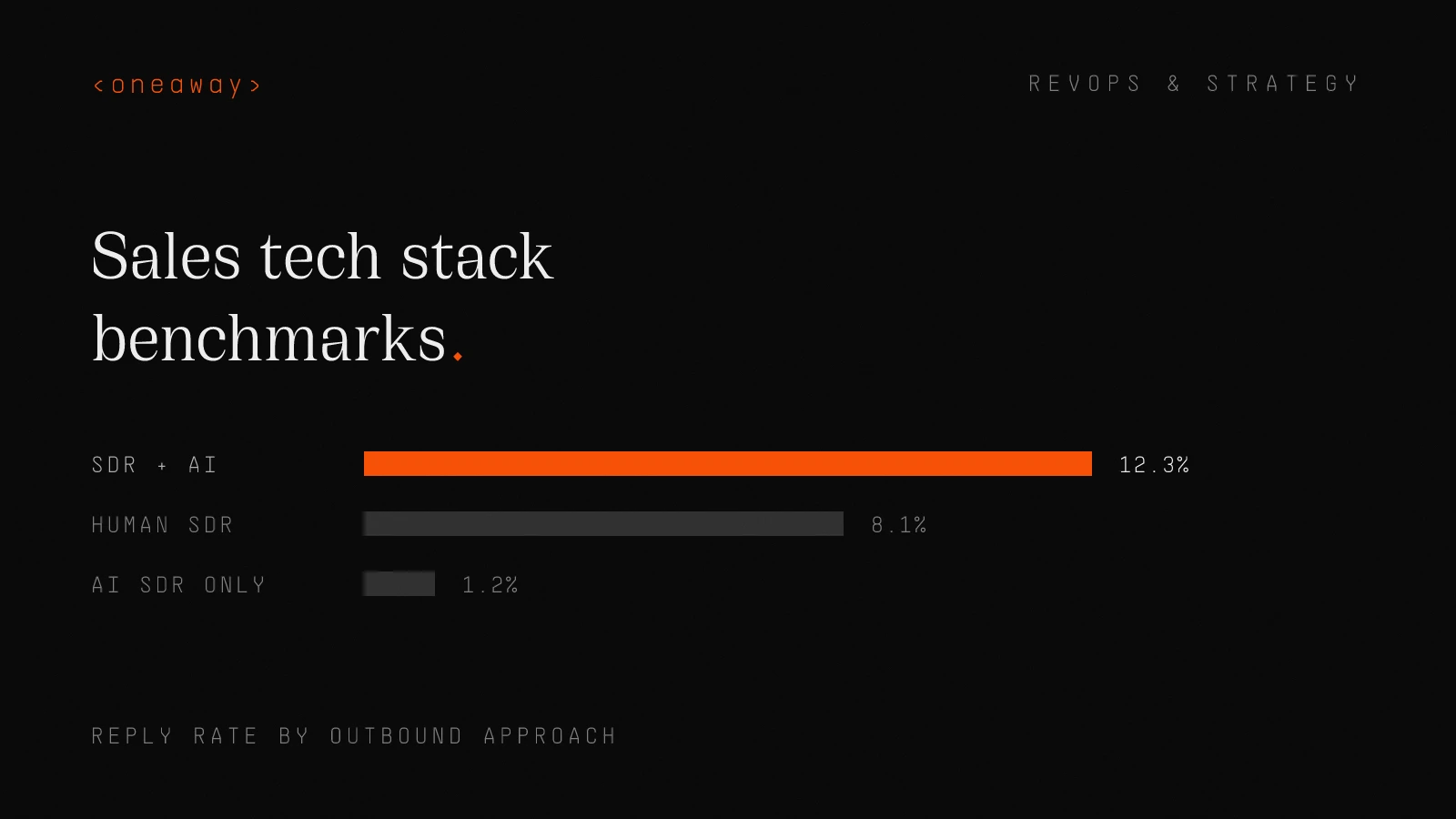
What doesn't work: fully autonomous AI SDRs that blast thousands of generic emails. The reply rates are abysmal and you're burning your domain reputation.
My recommendation: use AI to make your human SDRs 3x more productive, not to replace them. The math works better and the results are dramatically better.
- Clay for research and enrichment — Automates the data gathering that used to take 20 minutes per account
- Smartlead or Instantly for deliverability — Manages email infrastructure so your messages actually land in inboxes
- Outreach or Salesloft for sequencing — Orchestrates multi-channel touchpoints with proper timing and logic
- LinkedIn Sales Navigator for social selling — Still the best place to research and engage decision-makers
| Approach | Emails Sent | Reply Rate | Meeting Rate | Cost per Meeting |
|---|---|---|---|---|
| Off-shelf AI SDR | 12,400 | 1.2% | 0.3% | $312 |
| Traditional SDR | 890 | 8.1% | 2.4% | $98 |
| SDR + AI Assistance | 2,100 | 12.3% | 4.8% | $67 |
AI-Native vs. AI-Bolted-On: The Critical Difference
My current favorite AI-native sales tools: Clay for enrichment, Koala for buyer intent, Salesmotion for outbound automation. All built AI-first, not retrofitted.
- Does it require you to prompt it, or does it anticipate your needs? — AI-native tools act proactively, not reactively.
- Does it feel like a feature or like the core product? — If you can use 80% of the tool without touching AI, it's bolted-on.
- Does it get smarter over time based on your data? — AI-native tools learn from your usage patterns and improve.
- Does it eliminate work or just speed up existing work? — The best AI removes entire workflow steps, not just makes them faster.
Real Tech Stack Costs by Team Size
My recommendation: audit your sales tech stack costs quarterly. Pull every invoice. Calculate cost per active user, not cost per licensed seat. Kill anything below 40% adoption that isn't mission-critical.
- Duplicate data providers — Companies paying for ZoomInfo AND Apollo AND Seamless when one would suffice
- Overlapping engagement platforms — Using both Outreach and Salesloft, or multiple email automation tools
- Unused seats — Paying for 30 seats when only 18 people actively use the tool
- Feature overlap — Your CRM has built-in sequences but you're also paying for a separate engagement platform
- Integration tax — Paying for Zapier or Make to connect tools that should integrate natively
| Team Size | Minimum Viable Stack | Competitive Stack | Over-Tooled Stack |
|---|---|---|---|
| 1-5 SDRs/AEs | $18K-$32K/year | $47K-$68K/year | $85K+/year |
| 6-15 SDRs/AEs | $52K-$78K/year | $96K-$142K/year | $220K+/year |
| 16-30 SDRs/AEs | $98K-$156K/year | $178K-$284K/year | $425K+/year |
| 31-50 SDRs/AEs | $164K-$247K/year | $312K-$468K/year | $680K+/year |
What the Fastest-Growing B2B Companies Actually Use
What they're NOT using: pre-built AI agents, off-the-shelf sales automation, legacy point solutions, all-in-one platforms that try to do everything.
The pattern: they prefer best-in-class point solutions connected by custom integration work over comprehensive platforms that force them into standard workflows.
Now, here's the reality check: you probably don't have Stripe's engineering resources to build custom integrations. Most of my clients don't. That's fine. The lesson isn't to copy their specific stack. It's to copy their philosophy.
The philosophy: be extremely selective about what you adopt. Prefer tools that have great APIs and integrate well. Invest in integration and workflow design, not just tool selection.
This is what we do at oneaway. We help companies implement the philosophy of how fast-growing companies think about their revenue tech stack, even when they don't have the same resources.
- Salesforce or HubSpot for CRM — No surprises here. 89% used one of these two.
- Custom-built data pipelines — Most had engineering resources building proprietary data infrastructure instead of buying all-in-one solutions.
- Gong or Chorus for conversation intelligence — 76% had call recording and analysis. This was the most universally adopted category.
- Slack for internal communication — Used as a critical part of their revenue operations, not just team chat.
- Modern data stack (Snowflake, dbt, etc.) — Building their own revenue analytics instead of relying on CRM reporting.
The Tech Stack Consolidation Playbook
The most common mistake: trying to consolidate too fast. I've seen companies remove 8 tools in one week and completely crater sales productivity for a month.
The second most common mistake: not involving reps in the process. If you consolidate tools without rep input, you'll face massive resistance and poor adoption of whatever you implement.
I ran this exact playbook with a 45-person sales team last quarter. Started with 17 tools, consolidated to 9. Tool costs dropped from $298K to $167K annually. Rep satisfaction with tools increased from 4.2/10 to 7.8/10.
The keys to successful consolidation: move slowly, involve your team, prioritize adoption over features, and measure everything.
- Step 1: Full Stack Audit (Week 1) — List every tool. Cost per year. Number of licensed seats vs. active users. Primary use case. Owner/champion. No judgment, just data collection.
- Step 2: Usage Analysis (Week 2) — Log in to each tool's admin panel. Pull actual usage data for the last 90 days. You'll be shocked. Tools you thought were essential have 15% login rates.
- Step 3: Feature Overlap Mapping (Week 2-3) — Create a spreadsheet showing which tools have overlapping capabilities. This is where you find the redundancies costing you $50K-$150K annually.
- Step 4: Rep Interviews (Week 3) — Talk to 8-10 reps across experience levels. Ask which tools they actually use daily, weekly, never. Ask which tools slow them down vs. speed them up.
- Step 5: Kill List (Week 4) — Based on usage data and rep feedback, create three lists: Keep (mission-critical), Evaluate (maybe keep), Kill (definitely removing).
- Step 6: Stakeholder Buy-In (Week 4-5) — Present findings to leadership. Show redundancies, costs, and impact on rep productivity. Get approval to proceed with consolidation plan.
- Step 7: Migration Plan (Week 6) — For each tool you're removing, document what's replacing that functionality. Create migration timeline. Identify technical dependencies.
- Step 8: Phased Rollout (Week 7-12) — Don't rip out everything at once. Phase your consolidation over 6-8 weeks. One change per week maximum. Monitor adoption and productivity.
Implementation Timeline: What to Expect
Total timeline for a complete stack overhaul: 14-20 weeks. Yes, that's 3.5 to 5 months. Anyone promising faster is either cutting corners or setting you up for failure.
You can compress this slightly if you're just adding 1-2 tools to an existing stack. But a full stack rebuild takes time to do right.
I rebuilt the entire revenue tech stack for a Series B company with 30 sales reps last year. We spent 16 weeks from kickoff to full adoption. Their revenue per rep increased 52% within 6 months of full implementation.
They wanted to do it in 8 weeks. I pushed back hard. If we'd rushed, we would have botched the CRM migration, lost historical data, and created franken-workflows that nobody understood.
The timeline isn't the enemy. Rushing is the enemy.
Your team is running a business while you're implementing new tools. They can't stop selling for a month while you rebuild everything. Phased rollouts with proper training are the only way to maintain productivity during transitions.
| Phase | Timeline | Key Activities | Success Metrics |
|---|---|---|---|
| Planning & Audit | 2-3 weeks | Current stack analysis, requirements gathering, tool selection | Complete tool inventory, defined requirements |
| Tool Selection | 2-4 weeks | Vendor demos, trials, technical evaluation, pricing negotiation | Selected tools with signed contracts |
| Technical Setup | 3-4 weeks | Integration configuration, data migration, workflow automation | All tools connected and syncing |
| Team Training | 2-3 weeks | Admin training, rep training, documentation creation | 80%+ team completion of training |
| Rollout & Adoption | 4-6 weeks | Phased rollout, adoption monitoring, workflow refinement | 70%+ daily active usage |
| Optimization | Ongoing | Performance monitoring, workflow improvements, ROI tracking | Defined KPIs trending positive |
Frequently Asked Questions
What is a B2B sales tech stack?
A B2B sales tech stack is the collection of software tools and platforms that sales teams use to find prospects, engage buyers, manage relationships, and close deals. In 2026, effective stacks typically include 6-9 core tools across six layers: CRM foundation, data enrichment, engagement automation, intelligence and signals, enablement and coaching, and revenue operations. The key is integration and workflow automation, not just tool collection.
How much should a B2B sales tech stack cost?
For a team of 6-15 sales reps, expect to spend $52K-$78K annually for a minimum viable stack, or $96K-$142K for a competitive stack. Costs scale with team size, but the relationship isn't linear — larger teams should see better per-rep economics. Teams spending more than $5K per rep annually are likely over-tooled with redundant solutions. The benchmark in 2026 is $3K-$4.5K per rep for a well-optimized stack.
Do AI SDR tools actually replace human SDRs?
No. Research shows that zero of the 63 fastest-growing B2B companies use off-the-shelf AI SDR tools. The winning approach in 2026 is humans doing strategic work (research, personalization, account selection) with AI handling repetitive tasks (data enrichment, follow-ups, CRM updates). This hybrid model generates 3-4x better results than fully autonomous AI SDRs, with reply rates of 12%+ vs. 1-2% for AI-only approaches.
What's the difference between AI-native and AI-bolted-on sales tools?
AI-native tools are built from the ground up with AI at their core — the AI anticipates your needs, acts proactively, and gets smarter over time based on your data. AI-bolted-on tools are legacy platforms with AI features added on top — usually requiring you to click an 'AI insights' button or prompt the AI for help. The difference in adoption rates is massive: AI-native tools see 3-4x higher usage because they eliminate work rather than just speeding it up.
How do I consolidate an over-tooled sales tech stack?
Start with a full audit of every tool's actual usage (not just licenses purchased) over the past 90 days. Create three lists: Keep (mission-critical), Evaluate (maybe keep), and Kill (definitely removing). Get rep feedback through interviews, not surveys. Present findings to leadership with data on redundancies and costs. Then implement a phased rollout over 6-8 weeks, making one change per week maximum. The key is involving your team and moving deliberately, not rushing.
What sales tools do the fastest-growing companies actually use?
Analysis of 63 of the fastest-growing B2B companies (Stripe, Anthropic, Databricks, Rippling, etc.) shows they prefer best-in-class point solutions over all-in-one platforms. Common tools include Salesforce or HubSpot for CRM (89% adoption), Gong or Chorus for conversation intelligence (76% adoption), and custom-built data pipelines rather than pre-packaged solutions. They prioritize tools with great APIs and deep integration capabilities, then build competitive advantages through custom workflows.
How long does it take to implement a new B2B sales tech stack?
A complete sales tech stack overhaul takes 14-20 weeks when done properly: 2-3 weeks for planning and audit, 2-4 weeks for tool selection, 3-4 weeks for technical setup, 2-3 weeks for training, 4-6 weeks for rollout and adoption, plus ongoing optimization. Rushing this timeline is the #1 reason sales technology projects fail. Teams need to continue selling while implementing new tools, so phased rollouts with proper training are essential to maintain productivity during transitions.
Key Takeaways
- AI-embedded sales teams generate 77% more revenue per rep than teams without it — but only when AI is embedded into actual workflows, not bolted on as features requiring extra clicks.
- High-performing sales teams use 6-9 core tools across six layers: CRM foundation, data enrichment, engagement automation, intelligence/signals, enablement/coaching, and revenue operations. More tools doesn't mean better results.
- The fastest-growing B2B companies use zero off-the-shelf AI SDR tools. They prefer specialized point solutions with great APIs over all-in-one platforms, building competitive advantages through custom integrations and workflows.
- Sales tech stack costs should be $3K-$4.5K per rep annually for well-optimized teams. Companies typically discover they're spending 40-60% more than expected when they audit actual costs including unused seats and redundant tools.
- Teams using AI to augment human SDRs see 12%+ reply rates vs. 1-2% for fully autonomous AI approaches. The winning model: humans do strategic work while AI handles repetitive tasks.
- CRM automation should eliminate 75-85% of manual data entry. High-performing teams spend 2-3 hours per week on CRM admin vs. 8-12 hours for struggling teams, returning 5-10 hours per rep to actual selling.
- Tech stack consolidation takes 14-20 weeks when done properly. Rushing implementation is the #1 reason sales technology projects fail. Phased rollouts with proper training maintain productivity during transitions.
Need help auditing and optimizing your B2B sales tech stack?
We've rebuilt revenue technology infrastructure for 40+ B2B companies, consistently reducing tool costs by 30-40% while improving rep productivity. If you're dealing with overlapping tools, low adoption rates, or wondering whether your stack is actually driving revenue, let's talk. We'll audit your current setup, identify redundancies, and build you a consolidated stack that your team will actually use.
Check if we're a fitContinue Reading
Best RevOps AI Stack Builders in 2026, Ranked by Speed
I spent six months testing every major RevOps AI stack builder. Here's who actually ships fast, who drowns you in professional services, and what I'd buy today.
Read more [ 14 MIN READ ]Best GTM Motion Frameworks in 2026, Ranked by Stage
The wrong GTM motion at your stage burns cash and kills momentum. Here's how to pick the right go-to-market strategy based on where you actually are, not where you want to be.
Read more [ 12 MIN READ ]Best ABM Platforms in 2026, Ranked by AI Features
I ranked the top account-based marketing platforms by their AI capabilities after running ABM programs at scale. Here's what actually works in 2026.
Read more