The Complete Guide to Cold Email Deliverability in 2026

I learned about email deliverability the hard way. When I was an SDR at Salesforce in 2019, I watched my entire domain get blacklisted because someone on the team decided to blast 5,000 emails on a Friday afternoon. Our reply rates went from 8% to 0.4% overnight. It took three weeks and a complete domain rebuild to recover.
That experience taught me something most people learn too late: cold email deliverability isn't about tricks or hacks. It's about building infrastructure that Gmail, Outlook, and every other inbox provider trusts. And in 2026, the bar is higher than it's ever been.
I've now helped clients at oneaway.io send over 12 million cold emails in the past 18 months. The teams that nail deliverability are booking 3-4x more meetings than those who don't. This guide covers everything I wish someone had taught me before that Salesforce disaster—the complete technical and strategic system for landing in the inbox in 2026.
Quick Answer
Cold email deliverability in 2026 requires proper SPF, DKIM, and DMARC authentication, multi-domain infrastructure with 3-5 mailboxes per domain, and a minimum 14-21 day warm-up period. Teams that nail deliverability book 3-4x more meetings than those who don't, yet only 3 out of 50+ audited client setups had all three authentication protocols configured correctly before getting help.
Why Deliverability Matters More in 2026
The good news? Most of your competitors are still ignoring these changes. When we nail deliverability for clients, they're not just getting better results—they're getting a massive competitive advantage because everyone else is landing in spam.
- Gmail's AI-powered filtering — Now analyzes sender patterns, engagement history, and content signals in real-time
- Microsoft's enhanced protection — Outlook implemented stricter bulk sender requirements in Q1 2025
- Yahoo and AOL policies — Require DMARC alignment for all bulk senders (yes, people still use AOL)
- Increased user reporting — Gmail now prompts users to report bulk senders more aggressively
Domain Infrastructure: The Foundation
Real example: A client came to us after burning through three domains in four months. They were sending 300 emails per day from a domain they'd registered the week before. We rebuilt their infrastructure with four aged domains, 12 warmed mailboxes, and proper rotation. Their inbox placement went from 34% to 89% in six weeks.
- Never send from your primary domain — Seriously. If you're sending from @yourcompany.com, you're one spam complaint away from torching your entire domain reputation
- Use subdomain variations — We set up mail.yourcompany.com, outreach.yourcompany.com, or hello.yourcompany.com as sending domains
- Age matters more than you think — New domains need 14-21 days of warm-up minimum. I've seen teams try to send cold emails on day 3 and wonder why they're blacklisted
- One domain per 3-5 mailboxes maximum — Don't cheap out and run 20 mailboxes on one domain. Gmail notices.
The Domain Rotation Strategy
This costs more upfront but saves you from the nightmare of rebuilding everything when a domain tanks. I learned this at Salesforce when we had to scramble to replace a burned domain during quarter-end. Never again.
- Month 1-2 — Domain A is primary sender, Domain B is warming up
- Month 3-7 — Both domains send at full capacity with proper volume limits
- Month 8 — Start warming Domain C, begin reducing Domain A volume
- Month 9 — Retire Domain A, Domain B becomes primary, Domain C is secondary
Technical Authentication Setup
If you don't have SPF, DKIM, and DMARC configured correctly, nothing else in this guide matters. This is table stakes in 2026.
I've audited 50+ client setups in the past year. Only 3 had all three configured properly before we started working together. Most had SPF and nothing else. Some had conflicting records that were actively hurting deliverability.
SPF (Sender Policy Framework)
`v=spf1 include:_spf.google.com include:sendgrid.net ~all`
The `~all` at the end is critical. It means 'soft fail'—emails from unauthorized sources should be marked suspicious but not rejected. Some guides recommend `-all` (hard fail), but in my experience, this causes more problems than it solves when you have multiple sending services.
Common mistake: Adding too many includes. SPF has a 10 DNS lookup limit. Go over that and your entire SPF record fails. I've seen this break deliverability for three different clients.
DKIM (DomainKeys Identified Mail)
DKIM is a digital signature that proves your email wasn't tampered with in transit. Your email service provider (ESP) generates this, but you need to add their DNS records to your domain.
At oneaway.io, we typically use Instantly, Smartlead, or Lemlist for cold email. Each requires adding their DKIM records to your DNS. This usually takes 5 minutes but can take up to 48 hours to propagate.
Pro tip: Always send a test email after setting up DKIM and check the headers. Look for 'DKIM=pass' in the authentication results. If you see 'DKIM=neutral' or 'DKIM=fail', your DNS records aren't configured correctly.
DMARC (Domain-based Message Authentication)
`v=DMARC1; p=none; rua=mailto:dmarc@yourcompany.com`
This sends you reports without affecting delivery. After a few weeks of monitoring, upgrade to `p=quarantine` (send to spam if authentication fails) or `p=reject` (block entirely).
I ran `p=none` for the first month at my last client, discovered their marketing team was sending from an unauthorized ESP, and prevented a deliverability disaster. Always monitor before enforcing.
Email Warm-Up Strategy That Actually Works
Critical mistake I see constantly: People turn off warm-up once they hit their target volume. Don't do this. I keep warm-up running indefinitely at a lower volume to maintain engagement signals.
When I was at AWS, we had a rep who turned off his warm-up tool to 'save money' ($30/month). His reply rates dropped 40% over the next three weeks. Cost of lost deals? Probably $200K+ in pipeline.
- Week 1 — 5-10 warm-up emails per day, zero cold outreach
- Week 2 — 15-20 warm-up emails per day, can start with 5-10 highly targeted cold emails
- Week 3 — 25-30 warm-up emails per day, increase cold emails to 15-20
- Week 4-6 — Maintain 30-40 warm-up emails daily, gradually scale cold emails to 40-50
- Month 2+ — Keep 20-30 warm-up emails running permanently as a baseline
Warm-Up Tools That Work in 2026
We primarily use Instantly for clients at oneaway.io because the larger warm-up pool means better reputation building. But honestly? Any reputable tool works if you follow the volume ramp properly.
The tool matters less than the discipline of not rushing the process.
| Tool | Best For | Price | Our Take |
|---|---|---|---|
| Instantly AI | High volume operations | $37/mo per mailbox | Best pool size, reliable delivery |
| Warmbox | Smaller teams | $15/mo per mailbox | Cheaper but smaller warm-up network |
| Lemwarm | Lemlist users | Included with Lemlist | Good if you're already using Lemlist |
| Mailreach | Monitoring + warmup | $25/mo per mailbox | Best deliverability testing features |
Sending Patterns and Volume Management
A fintech client came to us sending 200 emails per day from single mailboxes, all at exactly 9:00 AM EST. Their inbox rate was 23%. We split the volume across 6 mailboxes with randomized timing. Inbox rate jumped to 81% in three weeks.
- Randomize send times — Spread emails across 8 AM to 6 PM in the recipient's timezone, with random delays between each send
- Never exceed 50 emails per mailbox per day — Yes, some people claim you can do 100+. Those people are also complaining about deliverability in Reddit threads
- Match business hours — Don't send emails at 2 AM unless you want to look like a bot. I use timezone detection to send during 9 AM - 5 PM recipient local time
- Take weekends off — Seriously. Real humans don't send business emails on Sunday at 3 PM
The Right Way to Scale Volume
If you need to send 500 emails per day, you need 10-12 mailboxes. Not 3 mailboxes sending 150+ emails each. Math is simple but most teams cheap out on infrastructure and pay for it in deliverability.
I watched a team at Salesforce try to scale from 20 to 200 emails per day in one week. Their domain reputation tanked so hard that even their CEO's emails started landing in spam. Don't be that team.
- Month 1 — 10-20 emails per mailbox per day
- Month 2 — 25-35 emails per mailbox per day
- Month 3 — 40-50 emails per mailbox per day (this is the ceiling)
Content and Engagement Signals
Here's a real example from last month: Client was sending 'Re:' subject lines to fake email threads. Open rates were 40%+ but reply rates were 0.8%. Gmail started filtering them to spam within 3 weeks. We switched to honest subject lines, open rates dropped to 22%, but reply rates jumped to 4.2%. Inbox placement recovered completely.
Lesson: Tricks that inflate vanity metrics destroy deliverability. Always optimize for real engagement.
- Reply rate is king — Aim for 3-5% minimum. Under 1% and you're training Gmail that your emails are unwanted
- Open rates matter less than you think — Apple's MPP and Gmail's image proxy break open tracking. Focus on replies
- Time to delete/spam — If recipients immediately delete your email, that's a negative signal. Write subject lines that get opens from interested people only
- Forwarding and positive actions — When someone forwards your email or adds you to contacts, that's huge for reputation
Content That Maintains Deliverability
The best performing emails I've written at oneaway.io look like regular business emails. Short, personal, specific. No fancy formatting, no logos, no HTML signatures with social media icons.
When I was an SDR, my best emails were plain text, 50-80 words, with one specific question. Reply rates averaged 12-15%. The moment I started using our marketing team's branded email template, replies dropped to 4%.
- Spam trigger words — Free, guarantee, act now, limited time, click here—these aren't automatic death but they don't help
- Too many links — Keep it to 1-2 links maximum. I typically use one personalized link and one calendar link
- Images and attachments — Never send images or attachments in the first email. Huge spam signal
- ALL CAPS or excessive punctuation — Write like a human, not a used car salesman
- Broken personalization — {{First_Name}} in your email is a dead giveaway of automation. Test your merge tags
List Hygiene and Verification
Real numbers: A SaaS client was working with a 50,000 contact list from a data vendor. Before verification, estimated bounce rate was 18%. After running through Zerobounce, we removed 9,400 bad emails. Actual bounce rate after launch: 2.1%.
That $400 spent on email verification saved them from burning a $2,000 domain setup and weeks of warm-up time.
- Step 1: Email verification — Run every email through Zerobounce, Millionverifier, or Bouncer before uploading to your sending tool
- Step 2: Remove catch-alls — Catch-all emails (addresses that accept all mail to a domain) are risky. Remove them unless you have advanced verification
- Step 3: Suppress bounces immediately — If an email bounces, never email it again. Set up automatic suppression rules
- Step 4: Monitor engagement — If someone hasn't engaged in 3+ emails over 3 weeks, stop emailing them. They're hurting your reputation
Email Verification Tools Worth Using
We use Zerobounce for most clients at oneaway.io. Yes, it's more expensive. But when you're protecting domains worth thousands in setup costs and warm-up time, accuracy matters more than saving $50.
Pro tip: Verify emails right before sending, not weeks in advance. People change jobs. Email addresses expire. A list verified in January might have 5-8% more bounces by March.
| Tool | Accuracy | Price | Best For |
|---|---|---|---|
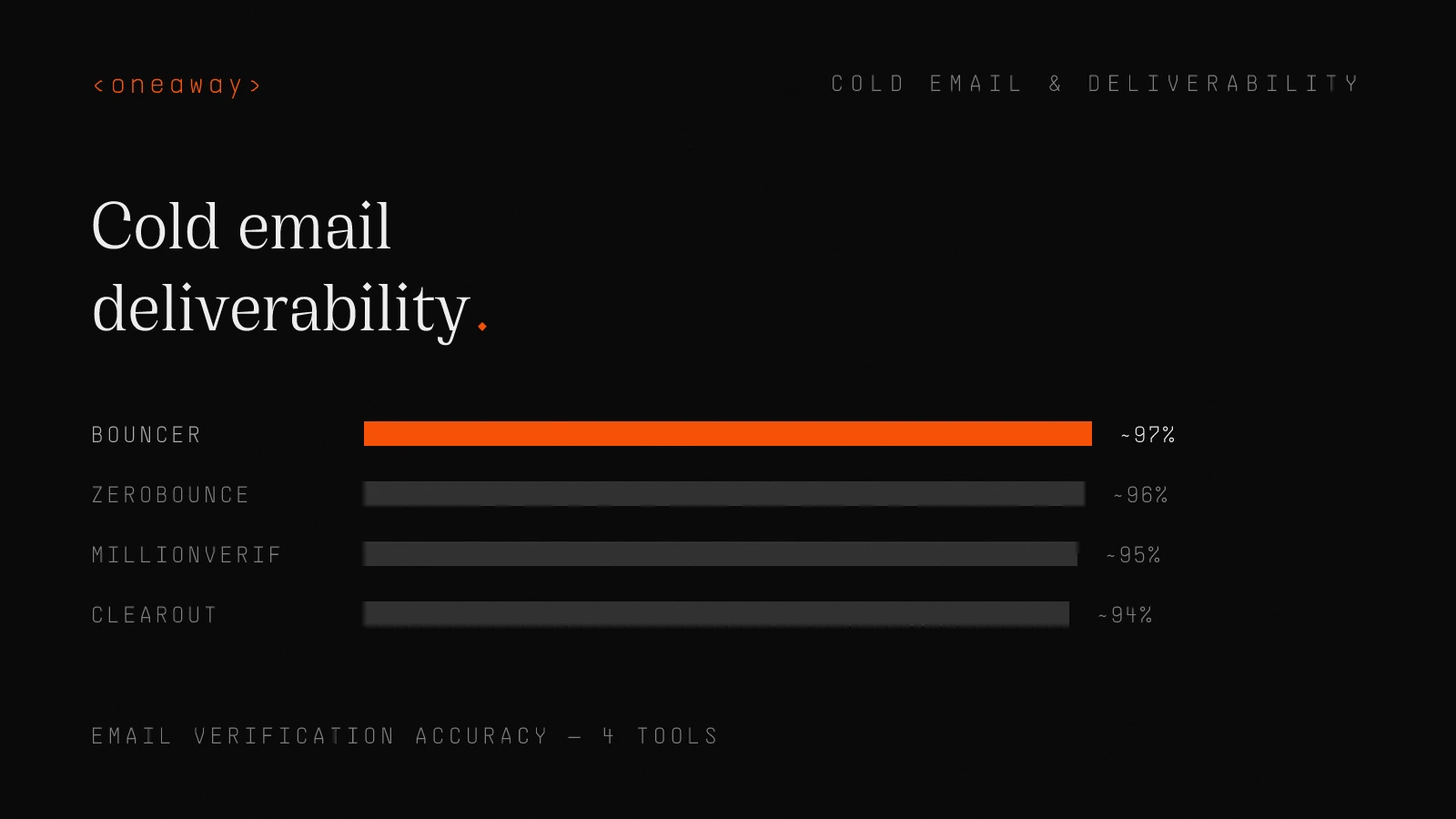
| Zerobounce | ~96% | $16/1K emails | Most accurate, best for high-volume |
| Millionverifier | ~95% | $4/1K emails | Budget option, still reliable |
| Bouncer | ~97% | $8/1K emails | Good middle ground |
| Clearout | ~94% | $12/1K emails | Built-in catch-all verification |
Monitoring and Recovery Protocols
I check these metrics every Monday morning for active campaigns. Bounce rate over 5%? Stop sending and investigate. Spam complaint rate over 0.1%? Review your targeting and copy. Inbox rate below 70%? Time to diagnose and fix.
At Salesforce, we had a dashboard that showed real-time deliverability metrics. When inbox placement dropped 15% week-over-week, we'd pause campaigns immediately and investigate. Most teams don't notice until they've sent 5,000 emails to spam.
- GlockApps or Mailreach — Monthly inbox placement tests across all major providers. Shows exactly where you're landing: inbox, spam, or promotions
- Google Postmaster Tools — Free from Google, shows domain reputation, spam rate, and authentication issues for Gmail
- Microsoft SNDS — Smart Network Data Services from Microsoft. Monitors your sending reputation for Outlook/Hotmail
- MXToolbox — Check if your domain or IP is on any blacklists. Run this weekly
- Native analytics — Track bounce rate, spam complaint rate, and reply rate in your sending tool. Set up alerts for anomalies
What to Do When Deliverability Tanks
Real story: Last year, a client's inbox rate dropped from 85% to 31% over a weekend. Turns out they'd imported a dirty list and sent to 3,000 bad emails. We stopped sending Friday afternoon, spent the weekend cleaning their list and reviewing DNS, resumed Monday at 25% volume to verified contacts only. Inbox rate recovered to 78% within 10 days.
If recovery takes longer than 3-4 weeks, consider retiring the domain and starting fresh. Sometimes it's faster than grinding through a damaged reputation.
- Step 1: Stop sending immediately — Don't try to power through. You're making it worse
- Step 2: Run diagnostics — Check blacklists, verify DNS records, review recent content and targeting changes
- Step 3: Clean your list aggressively — Re-verify all emails, remove anyone who hasn't engaged in the last 30 days
- Step 4: Increase warm-up volume — Double your warm-up emails to rebuild positive engagement signals
- Step 5: Resume sending conservatively — Start with 50% of previous volume to highly engaged segments only
- Step 6: Monitor obsessively — Check metrics daily until you're back to baseline
Email Personalization at Scale Without Breaking Deliverability
At oneaway.io, we use a combination of Clay for data enrichment and Instantly for sending. The key is using personalization to improve targeting, not just to fill merge fields.
Example: Instead of 'Hey {{FirstName}}, I noticed {{Company}} is hiring a Head of Sales…', we filter our list to only companies that posted that job in the last 14 days. The email is still personalized, but we're sending to 50 highly relevant people instead of 500 sort-of-relevant people.
Better targeting = better engagement = better deliverability. It's all connected.
- Use legitimate data sources — LinkedIn, company websites, recent news. Don't scrape personal details that feel creepy
- Personalize the reason for outreach, not just the greeting — {{FirstName}} at {{Company}} is lazy. Referencing their recent Series B or product launch shows you did homework
- Keep merge tags simple — Complex conditional logic in emails creates weird formatting that screams automation
- Test thoroughly — Send yourself test emails for every variant. I've seen {{Company_Name}} render as 'null' more times than I can count
Tools for Scalable Personalization
We typically use Clay for the heavy lifting—finding trigger events, enriching company data, generating personalized first lines based on recent activity. Then push to Instantly or Smartlead for sending.
Warning: Don't over-engineer personalization. I've seen teams spend 40 hours building a Clay table that generates 3-sentence personalized intros based on 15 data points. Reply rate: 3.2%. We tested a simpler version with one relevant data point. Reply rate: 4.8%.
More complexity ≠ better results. One highly relevant, timely personalization point beats five generic ones every time.
| Tool | Use Case | Price | Integration |
|---|---|---|---|
| Clay | Data enrichment and research automation | Starting at $149/mo | Integrates with everything |
| Instantly AI | Sending + basic personalization | $37/mo per inbox | Native variables and conditionals |
| Smartlead | Advanced personalization + sending | $39/mo + inbox costs | Deep personalization features |
| Hyperbound | AI-generated personalized first lines | $99/mo | API integration required |
Common Deliverability Mistakes to Avoid
I've audited over 50 cold email setups in the past 18 months. Here are the mistakes I see repeatedly that destroy deliverability:
Mistake #1: Sending from Your Primary Domain
I see this constantly. CEO wants to send cold emails from john@company.com because it 'looks more legitimate.' Then one spam complaint later, all company emails from sales, support, and product start landing in spam.
Never, ever send cold email from your primary domain. Use a subdomain or variation. This is non-negotiable.
Mistake #2: Buying Email Lists
Someone will sell you 100,000 emails for $500. Those emails will destroy your domain in 48 hours. The quality of data vendors varies wildly, and even the good ones (Apollo, ZoomInfo, Cognism) require verification before sending.
At AWS, I watched a new SDR buy a list of 'verified' emails from a random vendor. Bounce rate: 42%. His mailbox was permanently flagged within a week. Build your lists from reputable sources and always verify.
Mistake #3: Ignoring Negative Replies
When someone replies 'Not interested' or 'Remove me,' immediately stop emailing them. Some teams keep them in sequences hoping they'll change their mind. This generates spam complaints and tanks your reputation.
Set up automatic negative reply detection in your sending tool. Instantly, Smartlead, and Lemlist all have this feature. Use it.
Mistake #4: Inconsistent Sending Patterns
Sending 500 emails on Monday, then nothing Tuesday-Thursday, then 600 on Friday is a huge red flag. Inbox providers look for consistent, human-like sending patterns.
If you're only sending cold emails on certain days, keep warm-up emails running on off days to maintain consistency. I learned this the hard way when a client paused campaigns for two weeks over Christmas. Took 3 weeks to rebuild their reputation when they resumed.
Mistake #5: Not Testing Deliverability
Most teams have no idea where their emails are landing until their reply rates mysteriously drop to zero. Run monthly inbox placement tests using GlockApps, Mailreach, or Mail-Tester.
These tools cost $20-30 per test and can save you from months of sending to spam. It's the cheapest insurance policy in cold email.
Putting It All Together: The Complete System
This timeline assumes perfect execution. In reality, you'll hit issues—DNS propagation delays, temporary blacklists, engagement dips. Build buffer time into your plans.
When I launched cold email for a new market segment at AWS, leadership wanted us live in 2 weeks. I pushed back and got 6 weeks. We hit our meeting targets in month 2. The team that rushed their setup in 2 weeks? Still rebuilding their infrastructure 4 months later.
- Week 1: Infrastructure setup — Register subdomain, configure SPF/DKIM/DMARC, set up mailboxes, start warm-up
- Week 2-3: Warm-up and testing — Continue warm-up at increasing volume, run initial deliverability tests, send test emails to team
- Week 4: Soft launch — Begin sending to small, highly targeted segment (50-100 emails per day max) while monitoring closely
- Week 5-8: Scale gradually — Increase volume by 25% per week if metrics are healthy (inbox rate >75%, reply rate >2%)
- Week 9+: Ongoing optimization — Maintain sending patterns, monitor weekly, verify new contacts, rotate content to prevent fatigue
The Reality of Cold Email Deliverability in 2026
Here's what nobody tells you about cold email deliverability: it's not a set-it-and-forget-it system. Inbox providers constantly update their algorithms. Domains age. Engagement patterns shift. What works today might not work in 6 months.
The teams getting 15-20% reply rates and booking 30+ meetings per month aren't doing anything magical. They're just consistently monitoring, testing, and optimizing their deliverability infrastructure.
They're running monthly inbox tests. They're verifying email lists before every send. They're tracking engagement metrics and adjusting targeting when reply rates dip. They're rotating domains before they burn out.
At oneaway.io, we manage deliverability for clients because most teams don't have time to stay on top of all this while also writing copy, managing sequences, and booking meetings. But if you're doing it yourself, commit to treating deliverability as an ongoing project, not a one-time setup.
Because here's the truth: You can have the best copywriting, the most sophisticated personalization, and the perfect ICP. But if your emails land in spam, none of it matters.**
Frequently Asked Questions
What is a good cold email deliverability rate in 2026?
A good inbox placement rate in 2026 is 75-85%. Elite setups achieve 85-90%+. If you're below 70%, you have serious deliverability issues to address. Track this using tools like GlockApps or Mailreach with monthly tests, not just by watching bounce rates or open rates which don't tell the full story.
How long does it take to warm up an email address for cold outreach?
Minimum 14-21 days for basic warm-up, but I recommend 4-6 weeks for optimal results before sending at full volume. Start with 5-10 warm-up emails per day in week 1, gradually increasing to 30-40 per day by week 4. Keep warm-up running indefinitely at 20-30 emails per day even after reaching full sending volume.
How many cold emails can I send per day without hurting deliverability?
40-50 emails per mailbox per day maximum for sustainable deliverability. Some claim you can send 100+, but every time I've seen teams try this, deliverability crashes within 4-6 weeks. If you need higher volume, add more mailboxes rather than increasing per-mailbox limits. For 500 emails per day, use 10-12 properly warmed mailboxes.
Should I use my company's main domain for cold email?
Never send cold emails from your primary domain. Always use a subdomain like mail.yourcompany.com or outreach.yourcompany.com. One spam complaint or blacklist on your primary domain affects all company emails—from sales to support to your CEO. This is the most common mistake I see that causes catastrophic deliverability failures.
What's the fastest way to fix poor email deliverability?
Stop sending immediately and run diagnostics: check blacklists (MXToolbox), verify DNS records (SPF/DKIM/DMARC), review recent list quality, and test inbox placement. Clean your list aggressively, double warm-up volume, and resume at 50% previous volume to engaged segments only. Most issues recover in 10-14 days with this protocol. If recovery takes longer than 4 weeks, consider retiring the domain.
Do I need to verify emails before sending cold outreach?
Yes, absolutely. Always verify emails through tools like Zerobounce, Millionverifier, or Bouncer before sending. Bounce rates over 5% severely damage sender reputation. Verification costs $4-16 per 1,000 emails but saves you from burning domains worth thousands in setup costs. I've seen unverified lists have 15-20% bounce rates versus 2-3% after verification.
How often should I monitor cold email deliverability?
Check basic metrics (bounce rate, spam complaints, reply rate) weekly minimum during active campaigns. Run comprehensive inbox placement tests with GlockApps or Mailreach monthly. Monitor Google Postmaster Tools and Microsoft SNDS continuously. Set up alerts for bounce rates over 5% or spam complaint rates over 0.1% so you can stop sending and investigate immediately.
Key Takeaways
- Cold email deliverability in 2026 requires proper infrastructure first: Never send from your primary domain, use subdomains with proper SPF/DKIM/DMARC setup, and plan for 4-6 weeks of warm-up minimum before full sending volume.
- Volume limits are non-negotiable: Keep sending to 40-50 emails per mailbox per day maximum. Scale volume by adding more properly warmed mailboxes, not by increasing per-mailbox limits beyond sustainable thresholds.
- Email verification prevents catastrophic failures: Always verify email lists before sending using tools like Zerobounce or Millionverifier. Bounce rates over 5% destroy sender reputation—verification costs $4-16 per 1,000 emails but saves thousands in infrastructure.
- Engagement signals matter more than technical setup: Reply rates above 3%, low spam complaints, and positive actions (forwards, adds to contacts) build reputation. Perfect DNS records can't save emails that get 0% engagement.
- Monitor deliverability continuously, not reactively: Run monthly inbox placement tests, check Google Postmaster Tools weekly, and set up alerts for bounce/spam rate spikes. Most teams don't notice deliverability issues until they've sent weeks of emails to spam.
- Domain rotation prevents long-term degradation: Rotate sending domains every 6-9 months even if nothing breaks. Domains accumulate reputation debt over time, and starting fresh prevents catastrophic failures during critical campaigns.
- Personalization at scale requires targeting quality over quantity: Better to send 50 highly relevant, personalized emails with 8% reply rates than 500 generic emails with 1% reply rates. Engagement quality drives deliverability more than volume.
Related Reading
Need help building cold email infrastructure that actually reaches the inbox?
At oneaway.io, we've built deliverability systems for 50+ B2B companies that consistently achieve 80-90%+ inbox placement and 15-20% reply rates. We handle the entire technical setup—domain infrastructure, DNS configuration, warm-up strategy, and ongoing monitoring—so your team can focus on writing great emails and booking meetings. If you're tired of landing in spam or want to scale cold email without destroying deliverability, let's talk.
Check if we're a fitContinue Reading
Best Cold Email Tools 2026, Ranked by Inbox Survival
I tested 9 cold email platforms sending 2M+ emails. Here's what actually lands in the inbox in 2026—ranked by deliverability, rotating sender capability, and real-world survival rates.
Read more [ 14 MIN READ ]Best Email Outreach Tools for Small Teams (2026), by Setup Speed
I tested 10 email outreach tools and ranked them by how fast you can actually send your first campaign. Real setup times, honest pricing, and which platforms work for teams under 10.
Read more [ 12 MIN READ ]The 30/30/50 Budget Rule for B2B Founders, Ranked by Survival
Most B2B founders waste their GTM budget on the wrong channels. Here's the allocation framework that actually keeps companies alive, tested across 50+ early-stage startups.
Read more