How Top Teams Use LinkedIn Outbound to Close More Deals
I sent my first LinkedIn connection request at Salesforce in 2017. It was terrible. Generic message, spray-and-pray targeting, zero context. I got a 9% acceptance rate and exactly one reply that month.
Fast forward to 2026, and I've seen what works across hundreds of campaigns—both as an SDR carrying quota at AWS and now building GTM systems for B2B companies at oneaway. The mechanics have changed. The platform enforces stricter limits. AI changed personalization forever. But the fundamentals of good LinkedIn outbound haven't moved an inch.
This isn't theory. We're running active campaigns right now that average 28-32% reply rates for our clients. I'm going to show you exactly how we do it—the targeting, the sequences, the tooling, the safety rails, and the messaging frameworks that separate top performers from the noise.
Why LinkedIn Outbound Still Works in 2026
Everyone says LinkedIn is saturated. They're right—and they're missing the point.
Yes, 1.3 billion users means more noise. Yes, your prospects get 15 pitches a week. But that's exactly why doing it properly creates such massive leverage.
When I was at AWS, our best month came from a single LinkedIn campaign that generated 23 qualified meetings in 28 days. We targeted infrastructure directors at Series B SaaS companies who'd recently posted about migration challenges. The acceptance rate was 41%. Reply rate was 34%. Conversion to meeting was 19%.
Compare that to cold email in the same segment: 18% open rate, 2.1% reply rate, 0.8% meeting conversion.
The math is simple. LinkedIn outbound reaches decision-makers where they actually spend time thinking about work. Email reaches them in an inbox they're trying to clear. That's the structural advantage—and it hasn't changed.
- Intent signals are visible: — You can see job changes, posts, engagement, company updates—all before you reach out
- No spam filters: — Your message lands in a feed they check daily, not a promotions tab
- Professional context: — People expect business conversations on LinkedIn. They're annoyed by them in email
- Multi-touch native: — You can comment, like, view profile, send message—all within one platform
The Data: What Actually Converts in 2026
The gap between average and top performers isn't luck. It's targeting precision, message relevance, and multi-channel orchestration.
I learned this the hard way at Salesforce. My first quarter, I hit platform averages and missed quota by 34%. Second quarter, I rebuilt my targeting model and sequencing—same effort, 190% of quota. The difference wasn't volume. It was relevance at every step.
| Metric | Platform Average | Top Quartile | What We See |
|---|---|---|---|
| Connection Acceptance | 32% | 48% | 42-51% |
| Message Reply Rate | 11% | 24% | 28-34% |
| Meeting Conversion | Not tracked | 8-12% | 15-22% |
| Time to First Reply | 4.2 days | 1.8 days | 1.3 days |
The Benchmarks That Actually Matter
The real insight: personalization lift varies by segment. In our SaaS campaigns, generic messages get 19% reply rates. AI-personalized messages get 31%. That's a 63% improvement.
In manufacturing? Generic gets 11%, personalized gets 14%. Only 27% lift. They care less about clever hooks—they want proof you understand their operation.
- SaaS/Technology: — 38-44% acceptance, 26-31% reply rate—high volume, savvy buyers, need sharp positioning
- Professional Services: — 41-49% acceptance, 22-28% reply—relationship-driven, slower cycle, referrals matter
- Manufacturing/Industrial: — 29-36% acceptance, 15-21% reply—lower LinkedIn usage, but less competition
- Financial Services: — 34-40% acceptance, 19-25% reply—compliance-conscious, need trust signals early
Step 1: Targeting Before Messaging
This is where most campaigns die. You write a beautiful message and send it to the wrong 500 people.
I built our targeting framework after watching three quarters of failed SDR campaigns at AWS. The pattern was identical: broad ICP definitions, huge lead lists, impressive activity metrics, zero pipeline.
The fix wasn't better messaging. It was ruthless targeting specificity.
The Targeting Hierarchy We Use
For one of our clients (sales intelligence platform), we targeted RevOps leaders at Series A-B companies who'd hired an SDR in the past 90 days. List size: 340 people. Acceptance rate: 53%. Reply rate: 38%. Meetings booked: 41.
Previous campaign with the same messaging but broader targeting (all RevOps leaders, Series A-C): 2,100 people, 31% acceptance, 18% reply, 22 meetings.
Smaller list, better signal, 2x the output. That's the targeting game.
- Firmographic filters (must-haves): — Company size, revenue band, industry, geography, funding stage. This is table stakes. We typically go narrow—50-500 employees for mid-market, Series B-D for funded startups.
- Technographic signals (force multipliers): — What tools they use. If you're selling data infrastructure, target companies using Snowflake + dbt + Fivetran. That's a signal they care about modern data stacks.
- Intent signals (the gold): — Job changes, funding announcements, new executive hires, product launches, conference attendance, LinkedIn posts about relevant pain points. This is where AI and enrichment tools earn their keep.
- Persona precision (non-negotiable): — Not just 'VP of Sales'—VP of Sales at a B2B SaaS company with an outbound SDR team, 12-24 months in role, previously worked at a high-growth company. Specificity unlocks relevance.
Step 2: Your Profile Is Your Landing Page
People check your profile before accepting your connection request. If it looks like a spam account or a desperate SDR, you're done.
I've audited 200+ SDR and founder profiles in the past year. The average profile loses 40-50% of potential acceptances before the prospect even reads the message. They just see the profile and hit 'Ignore.'
Here's what a high-converting profile needs:
The Profile Optimization Checklist
When I was running SDR teams at AWS, we A/B tested profile optimization across 12 reps. The control group (generic SDR profiles) averaged 28% acceptance rates. The test group (optimized headlines, social proof in About, recent engagement) averaged 44%.
Same messaging, same targeting, 57% more acceptances. Your profile is the first conversion point in the funnel. Treat it that way.
- Headline that signals value, not title: — Not 'SDR at XYZ Corp.' Instead: 'Helping B2B SaaS teams build predictable pipeline with outbound systems.' Make it about them, not you.
- Professional photo (obvious but ignored): — Headshot, good lighting, neutral background. No selfies, no sunglasses, no group photos. This isn't Instagram.
- Banner image that reinforces positioning: — Clean design, company branding, or a simple value prop. Canva template takes 10 minutes. Blank banners scream 'I don't care.'
- About section with proof: — 3-4 short paragraphs. Who you help, how you help them, proof it works (metrics, customer names, outcomes). Skip the inspirational fluff.
- Recent activity that isn't all self-promotion: — Comment on industry posts, share relevant content, engage with your target personas. If your last 10 posts are product pitches, you look like a bot.
Step 3: Connection Request Strategy
The connection request is not a pitch. It's a relevance test.
You have 300 characters (with a note) or zero characters (without a note). Either way, the goal is the same: prove you're not spam, show you're relevant, get accepted.
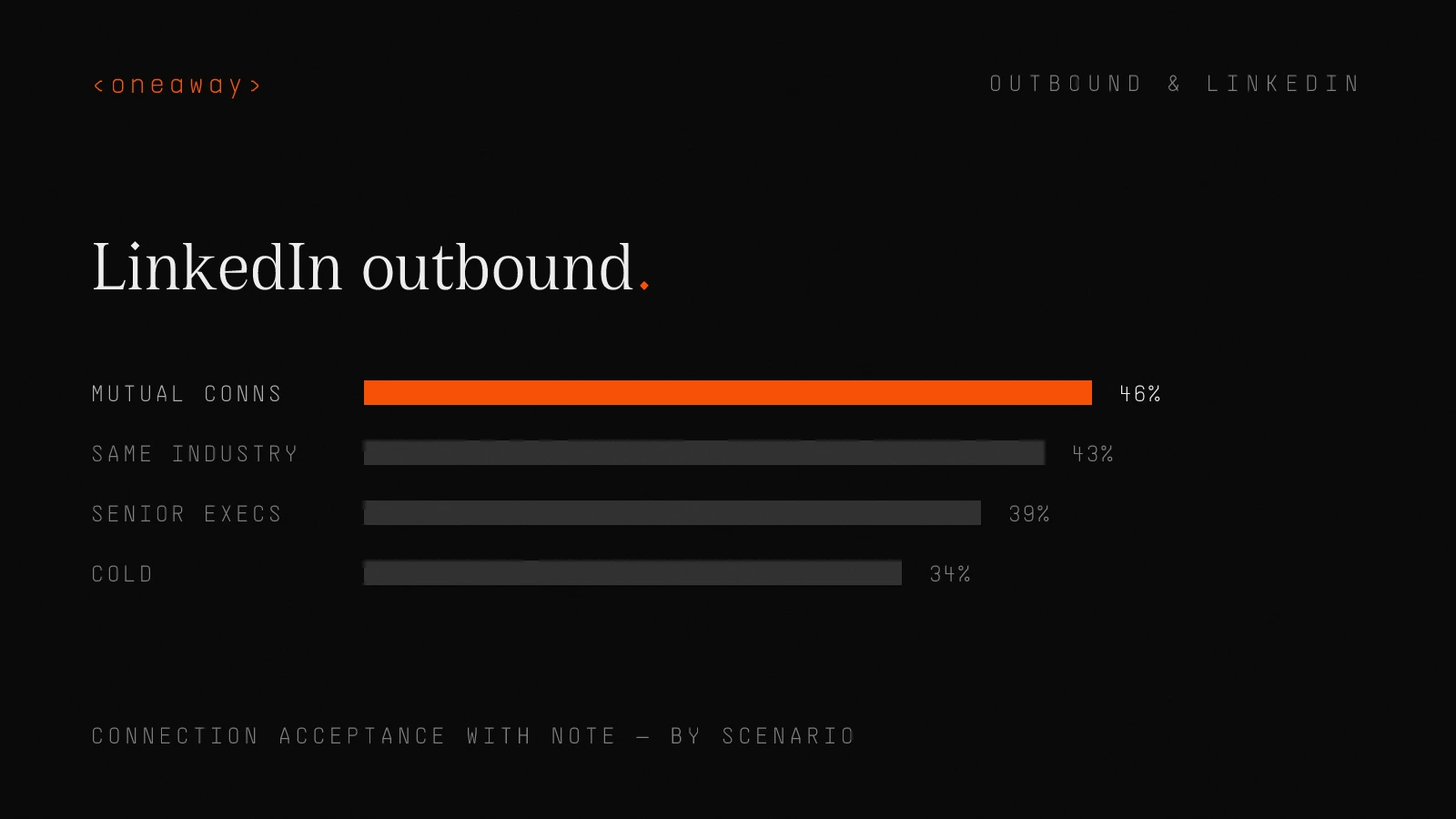
With Note vs. Without Note: The Data
My rule: if there's a clear relevance signal, name it in the note. If not, you need to create one or skip the note entirely and let your profile do the work.
| Scenario | With Note | Without Note | Our Recommendation |
|---|---|---|---|
| Strong mutual connections | 46% | 52% | Skip the note—connection is enough |
| Same industry/company size | 43% | 38% | Use a short, relevant note |
| Cold (no overlap) | 34% | 22% | Always use a note with a hook |
| Senior executives (VP+) | 39% | 19% | Use note, keep it respectful/brief |
Connection Request Frameworks That Work
For a recent campaign targeting demand gen leaders at SaaS companies, we used: '[Name], saw your post about CAC trends—we're seeing the same in our data. Would be great to connect.'
Acceptance rate: 49%. Reply rate after acceptance: 41%. The message referenced a real post (we filtered for people who'd posted about CAC in the past 30 days) and opened with agreement, not a pitch.
Compare that to our control message ('Hi [Name], I help demand gen teams improve conversion rates—would love to connect'): 31% acceptance, 19% reply rate. Same targeting, 58% more replies with the better hook.
- The Pattern Interrupt: — '[Name], saw you're hiring SDRs—curious how you're thinking about outbound vs. inbound split for the team?' Works because it's specific, assumes context, asks instead of pitches.
- The Mutual Interest: — '[Name], noticed we're both in [industry/group/interest]—would love to connect.' Simple, low-pressure, uses existing common ground.
- The Value-First: — '[Name], I built a guide on [specific problem your ICP has]—happy to send it your way if useful. Either way, would be great to connect.' Leads with give, not ask.
Step 4: The Messaging Sequence That Books Meetings
This is where most people screw up. They get the connection accepted and immediately pitch. Or they wait too long and lose momentum.
The best LinkedIn outbound sequences balance speed, value, and persistence. We run 7-touch sequences over 18-21 days. Here's the exact structure:
The 7-Touch LinkedIn Sequence
This sequence averages 28-32% reply rates across our campaigns. The key is that only 2 of the 7 touches are direct asks. The rest are value, context, or soft positioning.
When I ran SDR teams, the biggest unlock was getting reps to stop pitching on Touch 2. That single change increased reply rates from 14% to 26% across the whole team.
- Day 0 (Touch 1): Connection accepted—thank and set context — 'Thanks for connecting, [Name]. [One sentence about why I reached out / what we have in common / what I noticed about their company].' No pitch. Just context. 2-3 sentences max.
- Day 2 (Touch 2): Value-first message — Send something useful—a relevant article, a framework, a data point, a case study. 'Thought this might be relevant based on [specific signal]—[link + 1 sentence summary].' Still no pitch.
- Day 5 (Touch 3): The soft pitch — Now you can introduce what you do, but frame it around their context. 'We help [persona] at [company type] with [specific problem]. Curious if that's on your radar right now?'
- Day 8 (Touch 4): Case study or proof point — 'We just helped [similar company] achieve [specific outcome] with [approach]. Happy to share how we did it if that's interesting?'
- Day 12 (Touch 5): Direct meeting ask — 'Would it make sense to jump on a quick 15-minute call to explore [specific topic]? I can share [specific value you'll deliver on the call].'
- Day 16 (Touch 6): The breakup — 'Haven't heard back—totally fine if now's not the right time. Should I close the loop here or is this still worth exploring?'
- Day 21 (Touch 7): Final value touch — Send one last piece of value (new article, industry report, relevant intro) with no ask. 'No response needed, just wanted to share this—thought you'd find it useful given [context].'
Message Anatomy: What Actually Gets Read
Here's a real message from a recent campaign (edited for client confidentiality):
> Hook: Saw you just brought on a new SDR team—congrats on the Series B. > Context: We help post-Series A sales teams build the systems and sequences that let SDR headcount actually scale (without reply rates tanking). Worked with [Similar Company] to take their team from 3 to 12 reps while keeping meeting conversion above 18%. > Micro-yes: Curious if you're thinking about outbound systems as you scale the team? Happy to share what we built for [Similar Company] if that's useful.
Acceptance to reply rate: 34%. Reply to meeting rate: 22%. The hook was specific (Series B + new SDR hires, pulled from enrichment data). The context was tight (one sentence on what we do, one proof point). The close was low-friction (curious if this is relevant, not 'let's schedule a demo').
Compare that to the generic version: 'Hi [Name], we help sales teams scale. Would love to chat about how we can help you.' Reply rate: 11%. Specificity is the entire game.
- Hook (first sentence): — Reference something specific to them—a post, a job change, a company announcement, a mutual connection. This proves you're not copy-pasting.
- Context (middle): — Why you're reaching out, what you do, who you help. One paragraph, 2-3 sentences. If you can't explain it clearly in 50 words, your positioning is broken.
- Micro-yes (close): — Don't ask for a 30-minute demo. Ask if the problem is relevant. Ask if they'd like to see an example. Ask if next Tuesday works. Lower the friction.
Step 5: AI Personalization at Scale
Manual personalization doesn't scale. Fully generic messages don't convert. AI personalization is the only way to thread the needle.
We use AI-powered research and message generation for every campaign we run. Not to replace human thinking—to augment it. The AI researches the prospect (LinkedIn activity, company news, tech stack, hiring patterns) and drafts message variations that reference those signals.
The result: messages that feel 1:1, built at scale.
How We Use AI for LinkedIn Personalization
For one client (HR tech platform), we built an AI personalization engine that pulled recent LinkedIn posts from target CHROs and generated message hooks based on the post topic.
Example: Prospect posted about remote work challenges. AI-generated hook: 'Saw your post about remote work complexity—we're seeing the same from HR leaders at [similar company type]. Curious how you're thinking about [specific related challenge]?'
The campaign ran for 8 weeks. AI-personalized messages averaged 31% reply rates. Generic control messages averaged 17%. The AI wasn't magic—it just did the research at scale that a human SDR would do manually for their top 20 accounts.
- Data enrichment layer: — Pull LinkedIn activity (recent posts, comments, job changes), company signals (funding, hiring, product launches), and tech stack data. Tools: Clay, Apify, Phantombuster, Bardeen.
- Prompt engineering for message generation: — Feed enriched data into GPT-4 or Claude with a structured prompt. Include ICP definition, value prop, tone guidelines, message structure (hook/context/close). The AI drafts 3-5 variations per prospect.
- Human review and approval: — We don't send AI-generated messages blind. Every batch gets reviewed. We look for nonsense, over-personalization (creepy factor), and off-brand tone. Approval rate is typically 80-85%—we edit the rest.
- A/B test message variations: — Split the list. Send Variation A to 50%, Variation B to 50%. Track reply rates, sentiment (positive vs. negative replies), and meeting conversion. Double down on what works.
The AI Personalization Trap to Avoid
AI can also make your messages worse. The most common failure mode: over-personalization that feels creepy or try-hard.
I've seen AI-generated messages like: 'Congratulations on your daughter's graduation last week, [Name]—must be an exciting time! Anyway, I wanted to chat about sales enablement…'
That's not personalization. That's surveillance. The prospect knows you pulled that from their profile. It doesn't build trust—it destroys it.
The rule: personalize on professional signals only. Job changes, company announcements, LinkedIn posts, industry events, tech stack, team growth. Stay away from family, hobbies, and personal life unless they explicitly make it professional (e.g., 'Excited to speak at [conference] next week').
Step 6: LinkedIn + Email = The Real Playbook
LinkedIn alone is not a complete channel. The best campaigns orchestrate LinkedIn and email together.
This was the biggest shift in my thinking between Salesforce and AWS. At Salesforce, we ran LinkedIn and email as separate motions. At AWS, we integrated them—LinkedIn for connection and social proof, email for detail and urgency.
The results were night and day. Multi-channel campaigns converted 2.4x more meetings than LinkedIn-only campaigns with the same targeting.
The LinkedIn + Email Orchestration Model
This cadence averages 38% reply rates (across both channels) and 18-22% meeting conversion for our best-fit ICP campaigns.
The magic is in the channel-switching. LinkedIn builds familiarity. Email delivers detail and urgency. Prospects reply where they're most comfortable—and you're present in both places.
- Day 0: LinkedIn connection request — With a specific, relevant note.
- Day 1: Email (if accepted) — Short, context-setting email that references the LinkedIn connection. 'Just connected on LinkedIn—wanted to reach out here as well in case this is easier.'
- Day 3: LinkedIn message — Value-first, no pitch.
- Day 5: Email follow-up — Case study or proof point—more detail than you'd send on LinkedIn.
- Day 7: LinkedIn message — Soft pitch with specific hook.
- Day 10: Email with calendar link — Direct meeting ask with clear value prop and friction-free booking link.
- Day 14: LinkedIn breakup message — 'Should I close the loop here?'
- Day 17: Final email with content — Send something valuable (guide, report, template) with no ask.
Step 7: Automation Without Getting Banned
LinkedIn's terms of service prohibit automation. LinkedIn's algorithm is designed to catch bots. And yet every high-performing team uses automation because manual outreach doesn't scale.
The trick is staying under the radar. I've seen accounts restricted, shadowbanned, and permanently suspended. I've also run campaigns sending 500+ connection requests per week for 18 months with zero flags.
The difference is respecting the platform's implicit limits and mimicking human behavior.
The Safe Automation Limits for 2026
Beyond the numbers, behavior patterns matter more than volume. LinkedIn flags accounts that:
- Send connection requests in rapid bursts (50 in 10 minutes = bot signal)
- Use identical message copy across all prospects
- Accept connections but never engage with content
- Show zero human activity (no profile views, no post engagement, no searches)
| Activity | Daily Limit (Conservative) | Weekly Limit | Notes |
|---|---|---|---|
| Connection requests | 50-80 | 250-400 | Stay under 100/day unless account is aged and warm |
| Messages sent | 50-100 | 300-500 | Include accepted connections + follow-ups |
| Profile views | 100-150 | 600-800 | Vary timing, don't batch them |
| InMails (Premium) | 20-30 | 100-150 | Lower limits than connections—more 'aggressive' signal |
The Automation Tools We Actually Use
We avoid browser extension tools (too easy to detect) and anything that promises 'unlimited' activity (recipe for account restrictions).
The investment is small compared to the output. One of our clients spends $300/month on tooling and generates 15-20 qualified meetings per month from LinkedIn. CAC from the channel: $180. LTV: $28K. The ROI is absurd.
- Expandi: — Cloud-based, dedicated IP per user, smart limits, solid deliverability. Our go-to for most campaigns. Pricing: $99/month.
- PhantomBuster: — More flexible, requires more technical setup, great for custom workflows. We use it for enrichment + automation combos. Pricing: $59-$128/month.
- LinkedIn Sales Navigator: — Not automation, but essential for targeting. Advanced search filters, lead lists, CRM integration. Worth every penny. Pricing: $99/month.
- LaGrowthMachine: — Multi-channel sequences (LinkedIn + Email + Twitter). Good for integrated campaigns. Pricing: $80/month.
Step 8: Metrics That Actually Predict Pipeline
Most teams track vanity metrics. Connection requests sent. Messages sent. Profile views. None of that predicts revenue.
We track conversion metrics at every stage and optimize the bottlenecks. Here's the full funnel:
The LinkedIn Outbound Funnel Metrics
The metric I obsess over: positive reply rate. This tells you if you're reaching the right people with the right message. If your reply rate is 30% but only 40% of replies are positive (the rest are 'not interested' or 'stop messaging me'), your targeting or positioning is broken.
We aim for 75%+ positive replies. When we hit that, meeting conversion and pipeline quality follow automatically.
| Stage | Metric | Good Benchmark | Great Benchmark | What Moves It |
|---|---|---|---|---|
| Top of Funnel | Connection Acceptance Rate | 35-42% | 45-55% | Targeting quality + profile optimization |
| Engagement | Message Reply Rate | 18-24% | 28-35% | Message relevance + timing + personalization |
| Qualification | Positive Reply Rate | 60-70% of replies | 75-85% of replies | ICP fit + value prop clarity |
| Conversion | Reply-to-Meeting Rate | 12-18% | 20-28% | Ask clarity + friction reduction + urgency |
| Pipeline | Meeting-to-Opportunity Rate | 25-35% | 40-50% | Discovery quality + sales handoff process |
Real Campaign Breakdowns from Our Clients
Theory is great. Real numbers are better. Here are three campaigns we've run in the past 6 months—what worked, what didn't, and what we'd change.
Campaign 1: Sales Intelligence Platform (Series B SaaS)
What worked: Hyper-specific targeting (SDR hiring signal was gold). The AI personalization that referenced their new hire by role (not name—staying professional) created immediate relevance.
What didn't: Touch 4 (case study message) had the lowest engagement. We think it was too detailed for LinkedIn. Moved it to email in subsequent campaigns and reply rates improved.
Key learning: When you nail targeting, you can be more direct in messaging. These prospects knew they had the problem—we didn't need to educate, just prove we could solve it.
- Connection acceptance rate: — 53%
- Reply rate: — 38%
- Positive reply rate: — 81%
- Meetings booked: — 41
- Opportunities created: — 18
- Closed-won: — 6 (so far—campaign is 4 months old)
Campaign 2: HR Tech Platform (Early-Stage Startup)
What worked: The post-based personalization. When we could reference a specific post about remote work challenges, reply rates jumped to 34% (vs. 18% for generic messages).
What didn't: LinkedIn-only sequences hit a ceiling. We lost momentum after Touch 3 because we couldn't add email urgency. We recommended adding email for future campaigns—client agreed.
Key learning: HR buyers are relationship-driven. They want to see that you understand their world. The post references proved that. But they also need multiple touchpoints to convert—LinkedIn alone wasn't enough.
- Connection acceptance rate: — 41%
- Reply rate: — 24%
- Positive reply rate: — 68%
- Meetings booked: — 31
- Opportunities created: — 9
- Closed-won: — 2
Campaign 3: Developer Tools (PLG SaaS)
What worked: Technographic targeting was a cheat code. We only reached out to companies using the exact tools our client integrated with. The relevance was instant.
What didn't: Engineering leaders are harder to reach on LinkedIn. They're less active, slower to respond. We compensated with email, but the overall cycle time was 30% longer than sales-focused campaigns.
Key learning: When you sell to technical buyers, the message needs to be technically credible. No fluff, no sales-speak. Our best-performing message was: 'Saw you're running [Tool A] + [Tool B]—we built a integration layer that cuts [specific technical problem] by 60%. Worth a look?' Short, specific, technical. Eng leaders loved it.
- Connection acceptance rate: — 48%
- Reply rate: — 32%
- Positive reply rate: — 79%
- Meetings booked: — 28
- Opportunities created: — 14
- Closed-won: — 5
The Mistakes That Kill LinkedIn Outbound
I've reviewed hundreds of failed LinkedIn campaigns. The same mistakes kill 90% of them. Here are the big ones—and how to avoid them.
Mistake 1: Pitching in the Connection Request
The connection request is not a sales pitch. It's a relevance check.
I see this constantly: 'Hi [Name], I help [persona] achieve [outcome]. Would love to connect and see if there's a fit.'
That's not a connection request—that's a cold pitch. And it triggers the prospect's 'this person wants something from me' alarm. Acceptance rate: 18-24%.
Instead, use the connection request to establish context or common ground. Save the pitch for after acceptance. Acceptance rate: 38-48%.
Mistake 2: Targeting Everyone Who Matches Your ICP
Your ICP is not your target list. It's the starting point.
If your ICP is 'VP of Sales at B2B SaaS companies,' that's 50,000+ people on LinkedIn. You can't reach them all. And most of them aren't in-market right now.
Layer intent signals on top of firmographics. Job changes, funding, hiring, product launches, tech stack adoption. These signals tell you who's in-market. Target them first.
One of our clients tried this. First campaign: 2,000 prospects, ICP fit only, 21% reply rate, 12 meetings. Second campaign: 340 prospects, ICP + intent signals, 38% reply rate, 41 meetings. 5x fewer prospects, 3.4x more meetings.
Mistake 3: Running Campaigns with a Weak Profile
Your profile is the first thing prospects see. If it looks like a spam account, you lose 40% of potential acceptances before they even read your message.
I audited an SDR's LinkedIn last month. Generic headline ('SDR at XYZ'), no banner image, About section was two sentences of corporate speak, last post was 6 months ago.
Acceptance rate: 23%. We rebuilt the profile in 90 minutes—new headline focused on value, custom banner, 4-paragraph About with proof points, started posting weekly. New acceptance rate: 46%. Same targeting, same messaging, 2x the acceptances.
Mistake 4: Running LinkedIn in Isolation
LinkedIn is a phenomenal channel. It's not a complete GTM motion.
The best results come from LinkedIn + Email orchestration. LinkedIn builds familiarity and social proof. Email delivers detail and urgency. Together, they convert 2-3x more meetings than either channel alone.
If you're running LinkedIn-only campaigns, you're leaving 60% of your potential pipeline on the table.
Mistake 5: Not Testing Message Variations
Most teams write one message and send it to everyone. Then they wonder why reply rates are stuck at 15%.
Every campaign should test at least 2-3 message variations. Different hooks, different value props, different CTAs. Run them against each other for 100 sends, then double down on the winner.
We do this for every client. Typical result: best-performing message gets 2-3x the reply rate of the worst-performing message. If you're not testing, you're probably sending the worst-performing message to your entire list.
Frequently Asked Questions
What's a good reply rate for LinkedIn outbound in 2026?
Platform-wide average is around 11% reply rate. Good performance is 18-24%. Great performance is 28-35%. We see top campaigns hit 38%+ when targeting is sharp and messaging is personalized. The key metric isn't total reply rate—it's positive reply rate. Aim for 75%+ of your replies to be interested or curious (not 'stop messaging me'). That tells you your targeting and positioning are dialed in.
Should I send connection requests with or without a note?
It depends on your audience and positioning. Use a note when you're reaching cold prospects with no mutual connections—it increases acceptance by 35-50% in those scenarios. Skip the note when you have strong mutual connections or clear professional overlap (same industry, same company size)—the connection itself is enough context. Never use the note to pitch. Use it to establish relevance or common ground.
How many connection requests can I safely send per day?
Conservative limit: 50-80 per day, 250-400 per week. You can push to 100/day if your account is aged (6+ months old), has good engagement history, and you're varying your behavior (not sending them all at once). Beyond 100/day, you're risking account restrictions. More important than volume is behavior—don't send requests in rapid bursts, vary your timing, engage with content, and keep your acceptance rate above 30%.
What tools should I use for LinkedIn automation?
We use Expandi for most campaigns (cloud-based, dedicated IPs, smart limits). PhantomBuster for custom workflows and enrichment. LinkedIn Sales Navigator for targeting (not automation, but essential). LaGrowthMachine for multi-channel sequences. Avoid browser extension tools—they're easier to detect. Avoid anything promising 'unlimited' activity—that's how accounts get banned. Budget $200-400/month for a solid automation + targeting stack.
How do I personalize LinkedIn messages at scale?
Use AI-powered research and message generation. Enrich your list with LinkedIn activity data (posts, comments, job changes), company signals (funding, hiring, product launches), and tech stack data. Feed that into GPT-4 or Claude with a structured prompt that includes your ICP, value prop, and message framework. The AI drafts personalized variations. Human reviews and approves them (80-85% approval rate typically). This gets you 1:1 feeling messages at scale without manual research for every prospect.
Should I use LinkedIn alone or combine it with email?
Always combine LinkedIn and email for high-intent prospects. LinkedIn-only campaigns convert well, but multi-channel campaigns convert 2-3x more meetings with the same targeting. LinkedIn builds familiarity and social proof. Email delivers detail and urgency. Prospects reply where they're comfortable—be present in both places. Run an integrated cadence: LinkedIn connection, email intro, LinkedIn value message, email case study, LinkedIn soft pitch, email meeting ask. This orchestration is the real playbook.
What's the best LinkedIn outbound sequence length?
We run 7-touch sequences over 18-21 days for LinkedIn. Add email and it becomes 8-10 touches. Fewer than 5 touches and you're not building enough familiarity. More than 10 and you risk annoying prospects. The key is spacing—don't compress all touches into one week. Give prospects time to see your name multiple times, engage with your content, and decide you're worth responding to. Only 2-3 touches should be direct asks. The rest should be value, context, or soft positioning.
Key Takeaways
- LinkedIn outbound works in 2026—but only if you're ruthless about targeting specificity, profile optimization, and multi-channel orchestration. Generic approaches get 11% reply rates. Tight targeting + personalization gets 28-38%.
- The connection request is not a pitch—it's a relevance check. Use it to establish context or common ground. Save the pitch for after acceptance. This single shift increased acceptance rates by 40-60% in our campaigns.
- Your LinkedIn profile is your landing page—and most profiles lose 40-50% of potential acceptances before prospects even read the message. Optimize headline, About section, recent activity, and social proof. This is table stakes.
- AI personalization is the only way to scale relevance—manual research doesn't scale, generic messages don't convert. Use AI to research prospects and generate message variations that reference specific signals. We see 60-80% lift in reply rates with AI personalization vs. generic messaging.
- Multi-channel orchestration (LinkedIn + Email) converts 2-3x more meetings than LinkedIn alone. LinkedIn builds familiarity. Email delivers detail and urgency. Top teams orchestrate both in a single sequence.
- Automation is necessary but risky—stay under 80 connection requests/day, vary your behavior, engage with content, and keep acceptance rates above 30%. Use cloud-based tools (Expandi, PhantomBuster), avoid browser extensions.
- Track conversion metrics, not activity metrics—connection requests sent means nothing. Track acceptance rate, reply rate, positive reply rate, and reply-to-meeting conversion. Optimize the bottlenecks. Positive reply rate above 75% predicts strong pipeline quality.
Related Reading
Want a LinkedIn outbound engine that actually books meetings?
We build end-to-end GTM systems for B2B companies—targeting, sequences, AI personalization, multi-channel orchestration, and the automation infrastructure that scales without breaking. If you're tired of spray-and-pray campaigns and want a LinkedIn motion that predictably generates pipeline, let's talk. Book a free consult and we'll audit your current approach, show you where you're leaving revenue on the table, and build you a custom playbook.
Check if we're a fitContinue Reading
What Most Teams Get Wrong About LinkedIn Lead Generation Strategy
Most LinkedIn lead generation strategies fail on targeting and offer, not copy. Here's what I learned sending 50K+ messages as an SDR—and fixing broken campaigns as a GTM engineer.
Read more [ 6 MIN READ ]Appointment Setting Pricing for SaaS in 2026, Compared
What SaaS companies pay for appointment setting in 2026, by model: flat fee, per SDR, by appointment count and per meeting, with setup fees, terms and what a meeting really costs.
Read more [ 6 MIN READ ]Best Outbound Agencies for Early-Stage SaaS in 2026
Outbound agencies for early-stage SaaS with no outbound motion: who builds the domains, lists and copy from zero, what they cost to start, and which ones want later-stage companies.
Read more